
Polygon Pop Art
Loading the math board and drawing, please wait…
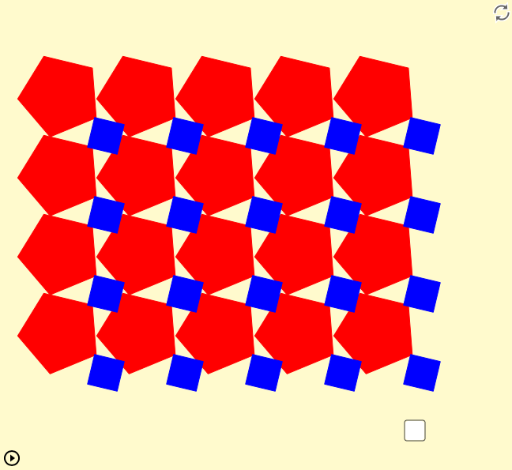
This example features two different rectangular grids of polygons that rotate at the same speed, creating a pop art effect. It demonstrates the rotation and geometric construction of polygons. Using GeoGebra commands such as Sequence, Join, Vector, Rotate, and Textfield, you can adjust the number of sides, size, and starting position of each polygon. Suitable for high school mathematics education and learning.
GeoGebra Commands & Parameters
Sequence(Sequence[A + (2 * (j, (-k))), j, 0, w - 1], k, 0, h - 1) → list1Join(list1) → PointsVector(A, C) → vRotate(D, α, C) → D'Vector(C, D') → cRotate(B, α, A) → B'Vector(A, B') → uSequence(Polygon[Element[Points2, i], Rotate[Element[Points2, i], (360 * ° / n), Element[Points, i]], n], i, 1, (h * w)) → list2Sequence(Polygon[Element[PointsC2, j], Rotate[Element[PointsC2, j], (360 * ° / i), Element[PointsC, j]], i], j, 1, (h * w)) → list3Textfield(h) → inputBox1Textfield(w) → inputBox2
AI Drawing Prompt Reference
Create a rectangular grid of rotating polygons, with each grid containing a different number of polygons that rotate around a central point, creating a pop art effect. Adjust the number of polygons, size, and starting position by entering the number of rows and columns in the input boxes.
The prompt above was compiled from the original drawing commands and is for reference only.