
Polygon Area Summary
Loading the math board and drawing, please wait…
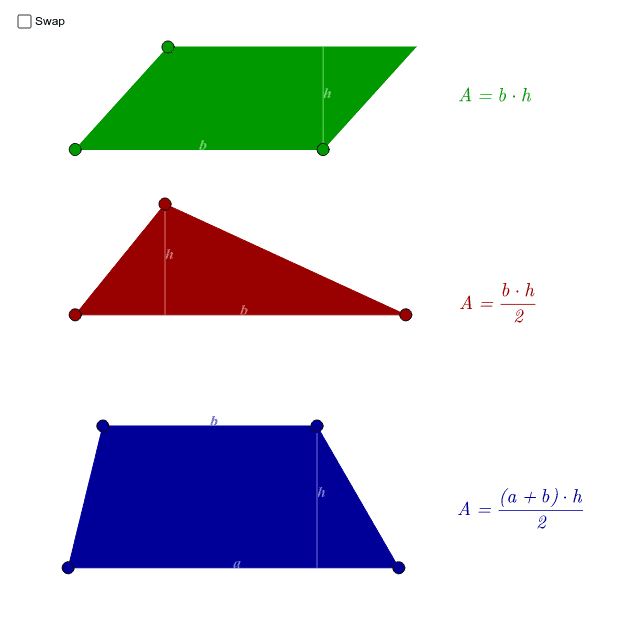
This example demonstrates how to calculate the area of a polygon using geometric construction. Key mathematical concepts include polygons, random variables, and arithmetic operations. Using GeoGebra commands such as Polygon, Line, Intersect, etc., the construction of polygons and their area calculation are illustrated. Suitable for middle school and above students to learn polygon area calculation methods.
GeoGebra Commands & Parameters
Polygon(A, B, C) → poly1, c, a, bLine(A, B) → trLine1Line(C, A) → trLine2OrthogonalLine(C, trLine1) → dIntersect(trLine1, d) → TrH1Segment(C, TrH1) → trH1OrthogonalLine(B, trLine2) → fIntersect(trLine2, f) → TrH2Segment(B, TrH2) → trH2Segment(B, TrH1) → trBseg1Segment(A, TrH1) → trBseg2Segment(C, TrH2) → trBseg3Segment(A, TrH2) → trBseg4Text("h", Midpoint[trH1]) → trHText1Text("h", Midpoint[trH2]) → trHText2Text("b", Midpoint[c]) → trBText1Text("b", Midpoint[b]) → trBText2Line(D, E) → pLineLine(F, E) → pLine2_1Line(F, pLine) → pLine2Line(D, pLine2_1) → pLine3Intersect(pLine2, pLine3) → GPolygon(D, E, F, G) → poly2, d_1, e_1, f_1, gOrthogonalLine(F, pLine) → hIntersect(pLine, h) → PH1Segment(F, PH1) → pH1Segment(E, PH1) → pBseg1Segment(D, PH1) → pBseg2OrthogonalLine(F, pLine3) → iIntersect(pLine3, i) → PH2Segment(PH2, F) → pH2Segment(PH2, G) → pBseg3Segment(D, PH2) → pBseg4Text("h", Midpoint[pH1]) → pHText1Text("b", Midpoint[D, E]) → pBText1Text("h", Midpoint[pH2]) → pHText2Line(H, I) → tLine1Ray(J, J + Vector[I, H]) → tRayPoint(tRay) → KPolygon(H, I, J, K) → poly3, h_1, i_1, j, kOrthogonalLine(J, tLine1) → lIntersect(l, tLine1) → THSegment(J, TH) → thText("h", Midpoint[th]) → tHTextText("a", Midpoint[H, I]) → tATextText("b", Midpoint[K, J]) → tBTextSegment(TH, I) → tBseg1Segment(H, TH) → tBseg2Text("b", Midpoint[E, F]) → pBText2
AI Drawing Prompt Reference
Draw three polygons to illustrate area formulas. First, a triangle with three sides, drop perpendiculars from vertices to opposite sides, mark the feet, draw segments for heights, label the midpoint of each height with 'h' and the midpoint of each base with 'b'. Second, a parallelogram formed by two pairs of parallel lines, drop a perpendicular from a vertex to the base, mark the foot, draw a segment for the height, label 'h' and 'b' similarly. Third, a trapezoid with one base, one slanted side, and two parallel lines, drop a perpendicular from a vertex to the base, mark the foot, draw a segment for the height, label 'a' at the midpoint of the base, 'b' at the midpoint of the slanted side, and 'h' on the height. Use solid lines and clear labels.
The prompt above was compiled from the original drawing commands and is for reference only.