
Identifying Polygons - Part 2
Loading the math board and drawing, please wait…
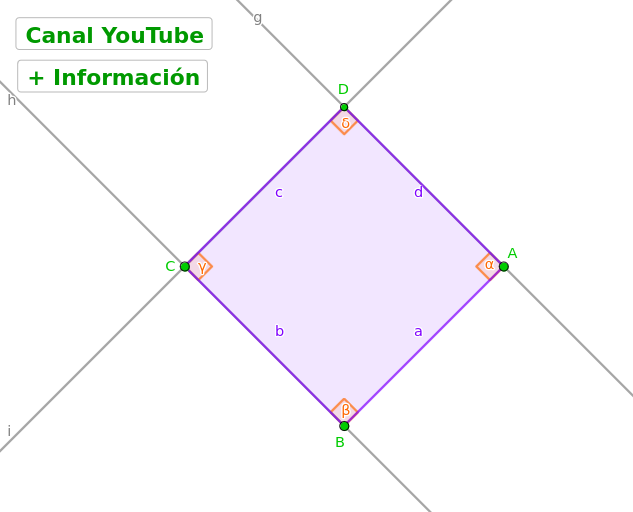
This example demonstrates how to identify polygons using coordinate geometry and geometric constructions. It involves core concepts like coordinate geometry, linear equations, angle calculations, and polygon construction. Key GeoGebra commands used in the construction include Segment, OrthogonalLine, Point, Line, Intersect, Polygon, and InteriorAngles. Suitable for high school mathematics education to understand and apply polygonal geometric properties.
GeoGebra Commands & Parameters
Segment(A, B) → fOrthogonalLine(A, f) → gOrthogonalLine(B, f) → hPoint(h) → CLine(C, f) → iIntersect(g, i) → DPolygon(A, B, C, D) → c1, a, b, c, dInteriorAngles(c1) → α, β, γ, δ
AI Drawing Prompt Reference
Draw a horizontal segment as the base. From each endpoint, construct a perpendicular line upward, creating two vertical parallel lines. Pick a point on one vertical line, then draw a line through this point parallel to the base, intersecting the other vertical line. Connect the two base endpoints, the chosen point, and the intersection point in order to form a quadrilateral. Finally, mark and display the four interior angles of this quadrilateral.
The prompt above was compiled from the original drawing commands and is for reference only.