
Polygon Area and Transformation Demo
Loading the math board and drawing, please wait…
In collections
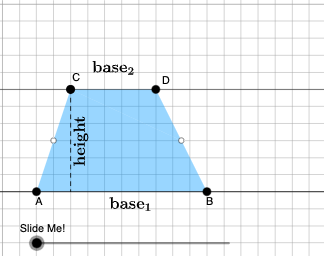
Area of a Trapezoid: Intuitive Discovery
This example demonstrates the area calculation and geometric transformations of a polygon, involving core math concepts like polygons, area, perimeter, rotation, translation, and similarity transformations. GeoGebra commands such as Point, Polygon, Rotate, Translate, Dilate are used to construct and transform the shapes, suitable for high school mathematics teaching and geometric construction learning.
GeoGebra Commands & Parameters
Point(Ray[A, A + (1, 0)]) → BPointIn(d) → CPolygon(A, B, C) → t1, f, a, bOrthogonalLine(C, g) → hIntersect(g, h) → C_{1}Point(Ray[C, C + (1, 0)]) → DDilate(C, If[0 < c ≤ 1, 1 - c, 0], D) → F'Dilate(D, If[1 < c ≤ 2, 2 - c, 0], C_{1}) → D'Rotate(C, If[2 < c ≤ 3, ((c - 2) * pi), pi], D) → F'_{1}Rotate(F', If[2 < c ≤ 3, ((c - 2) * pi), pi], D) → F''Angle(C, B, A) → βAngle(B, A, C) → γIf(γ ≟ pi / 2, 12, 16) → oMidpoint(B, D) → EPolygon(A, B, E, C) → q1, a_1, b_1, e, c_1Polygon(E, D, C) → t2, c_2, e_1, d_1Dilate(D, If[0 < c ≤ 1, 1 - c, 0], E) → D'_{1}Segment(D, D'_{1}) → iRotate(D, If[1 < c ≤ 2, ((-(c - 1)) * pi), (-pi)], E) → D'_{2}Rotate(D'_{1}, If[1 < c ≤ 2, ((c - 1) * pi), pi], E) → FSegment(D'_{2}, F) → i'Segment(C, D) → jSegment(A, C) → kDilate(C, If[2 < c ≤ 3, 3 - c, 0], E) → C'Segment(C, C') → lRotate(E, If[4 < c ≤ 5, ((-(c - 4)) * pi), (-pi)], E) → E'Rotate(D, If[4 < c ≤ 5, ((-(c - 4)) * pi), (-pi)], E) → D'_{3}Rotate(C, If[4 < c ≤ 5, ((-(c - 4)) * pi), (-pi)], E) → C'_{1}Polygon(E', D'_{3}, C'_{1}) → t2', c'_{1}, e', d'_{3}Segment(C'_{1}, D'_{3}) → mSegment(D'_{3}, E) → nSegment(C'_{1}, E) → pAngle(E, C'_{1}, D'_{3}) → αOrthogonalLine(C, g) → qIntersect(g, q) → GMidpoint(C, G) → HDilate(C, If[6 < c ≤ 7, 7 - c, 0], H) → C'_{2}Segment(C, C'_{2}) → rDilate(H, If[7 < c ≤ 8, 8 - c, 0], G) → H'Segment(H, H') → sRotate(C, If[8 < c ≤ 9, ((-(c - 8)) * pi), (-pi)], H) → C'_{3}Rotate(C'_{2}, If[8 < c ≤ 9, ((-(c - 8)) * pi), (-pi)], H) → ISegment(C'_{3}, I) → r'Midpoint(k) → JDilate(E, If[9 < c ≤ 10, 10 - c, 0], H) → E'_{1}Dilate(J, If[9 < c ≤ 10, 10 - c, 0], H) → J'Segment(J, J') → tSegment(E, E'_{1}) → f_1Polygon(A, C'_{1}, E, J) → q2, a_2, g_1, e_2, j_1Polygon(E, C, J) → t3, j_2, e_3, c_3Rotate(E, If[11 < c ≤ 12, ((-(c - 11)) * pi), (-pi)], E) → E'_{2}Rotate(C, If[11 < c ≤ 12, ((-(c - 11)) * pi), (-pi)], E) → C'_{4}Rotate(J, If[11 < c ≤ 12, ((-(c - 11)) * pi), (-pi)], E) → J'_{1}Polygon(E'_{2}, C'_{4}, J'_{1}) → t3', j'_{1}, e'_{2}, c'_{4}Segment(J'_{1}, C'_{4}) → h_1Segment(C'_{4}, E) → i_1Segment(E, J'_{1}) → k_1Segment(A, J) → l_1Segment(J, C) → m_1OrthogonalLine(C'_{1}, g) → n_1Intersect(n_1, p_1) → KOrthogonalLine(J'_{1}, g) → q_1Intersect(q_1, g) → LDilate(J'_{1}, If[13 < c ≤ 14, 14 - c, 0], L) → MSegment(J'_{1}, M) → r_1Dilate(C'_{1}, If[13 < c ≤ 14, 14 - c, 0], K) → NSegment(C'_{1}, N) → s_1Polygon(A, L, J'_{1}, J) → q3, a_3, l_2, t_1, j_3Polygon(L, C'_{1}, J'_{1}) → t4, f_2, l_3, g_2Dilate(J'_{1}, If[15 < c ≤ 16, 16 - c, 0], J) → OVector(J'_{1}, O) → uTranslate(L, u) → L'Translate(C'_{1}, u) → PTranslate(J'_{1}, u) → QPolygon(L', P, Q) → t4', q_2, l', p_2Segment(P, O) → h_2Segment(O, L') → i_2Polygon(A, C'_{1}, K, J) → q4, a_4, k_2, k_3, j_4Polygon(C'_{1}, J'_{1}, K) → t5, k_4, m_2, n_2Translate(C'_{1}, u) → RTranslate(J'_{1}, u) → STranslate(K, u) → K'Polygon(R, S, K') → t5', k', r_2, s_2Segment(R, Q) → t_2Segment(R, K') → b_2Point(f_3) → TIntersect(eq1, Line[A, B]) → USegment(T, U) → d_2Midpoint(A, B) → VMidpoint(C, D) → WRotateText(text2, pi / 2) → text4Midpoint(D'_{3}, C'_{1}) → ZRotateText(text3, (-((pi * (c - 5))))) → text5
AI Drawing Prompt Reference
The figure consists of a triangle that undergoes multiple geometric transformations. First, three points are drawn to form triangle ABC. Then, through rotations, dilations, and reflections, the triangle is transformed into multiple new positions. The figure includes multiple triangles combined, along with line segments connecting various points. During the transformation process, angles are calculated and similarity transformations are applied, resulting in a complex polygon structure. The figure illustrates the relationship between the original triangle and its transformed versions, as well as the connections between points. Overall, the figure presents a series of transformed triangles overlapping to create a geometric pattern with symmetry and layering.
The prompt above was compiled from the original drawing commands and is for reference only.