
Point on 3D Coordinate System
Loading the math board and drawing, please wait…
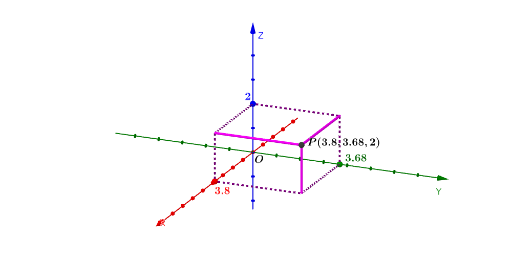
This example demonstrates how to locate a point in a three-dimensional coordinate system, involving concepts like coordinates, vectors, and geometric constructions. The construction uses GeoGebra commands such as Intersect, Point, Plane, and OrthogonalLine. It is suitable for students learning spatial geometry, helping to understand the relationship between coordinate systems and real-world shapes.
GeoGebra Commands & Parameters
Intersect(yAxis, zAxis) → DPoint(xAxis) → EPoint(yAxis) → FPoint(zAxis) → BPlane(D, F, B) → pPlane(D, E, B) → rOrthogonalLine(A, r) → fOrthogonalLine(A, p) → gIntersect(f, r) → CIntersect(g, p) → GOrthogonalLine(C, p) → hOrthogonalLine(G, r) → iIntersect(h, i) → HIntersect(yAxis, xAxis) → IPoint(yAxis) → JPoint(xAxis) → KPlane(I, J, K) → qOrthogonalLine(C, q) → jOrthogonalLine(G, q) → kOrthogonalLine(A, q) → lIntersect(j, xAxis) → LIntersect(k, yAxis) → MIntersect(l, q) → NPolygon(N, M, I, L) → q1, n, m, i_1, l_1Prism(q1, A) → a, O, edgeMO, edgeIP, edgeLQ, edgeAO, edgeOP, edgePQ, edgeAQ, P, Q, faceANMO, faceIMOP, faceILQP, faceANLQ, faceAOPQ, edgeANMidpoint(edgeAQ) → RMidpoint(edgeAO) → SMidpoint(edgeAN) → TSegment(L, N) → sSegment(N, M) → t
AI Drawing Prompt Reference
In a 3D coordinate system, mark several points on the axes and use them to define three related planes. From the origin, draw perpendiculars to these planes, and use the intersections to locate key points in space. Then, using these points and axis points, construct a prism whose base is formed by axis points and whose apex is a spatial point. Finally, take midpoints of three prism edges and connect adjacent base vertices to form auxiliary segments, illustrating the spatial relationships among points, lines, and planes.
The prompt above was compiled from the original drawing commands and is for reference only.