
Planet Orbit
Loading the math board and drawing, please wait…
In collections
Transformation
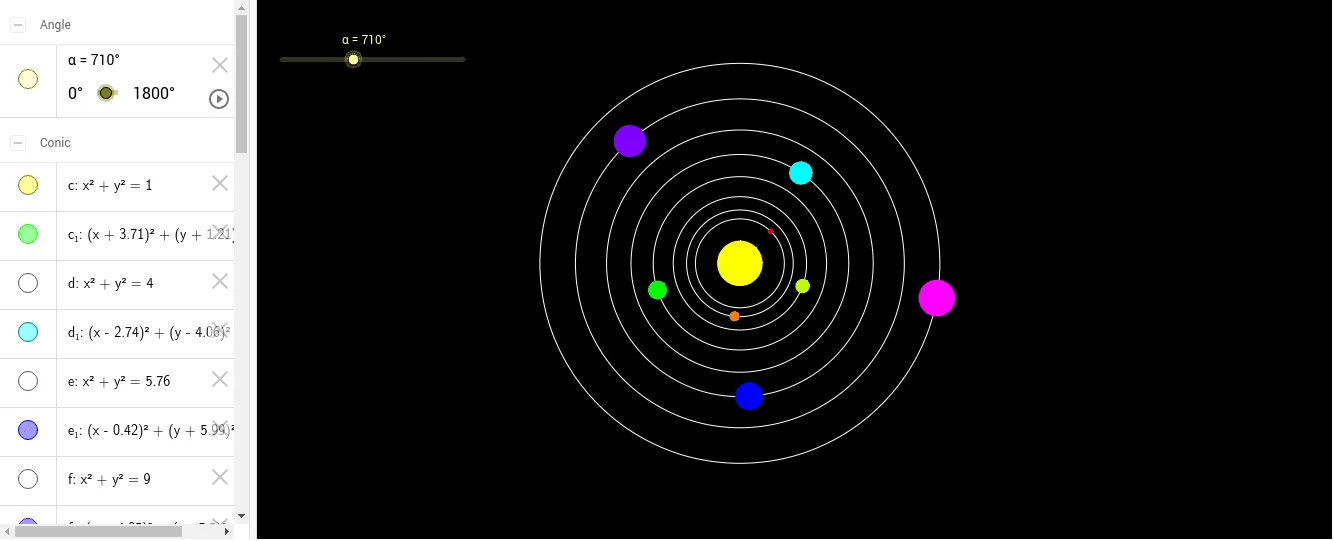
This example demonstrates the trajectory of a planet. It involves the geometric properties of circles and rotation transformations. Using GeoGebra commands such as Intersect, Circle, and Rotate, it dynamically shows the process of a planet orbiting the sun. Suitable for high school mathematics education, particularly in coordinate geometry and transformations.
GeoGebra Commands & Parameters
Intersect(xAxis, yAxis) → ACircle(A, 1) → cCircle(A, 2) → dCircle(A, 2.4) → eCircle(A, 3) → fCircle(A, 3.9) → gCircle(A, 4.9) → hCircle(A, 6) → kCircle(A, 7.4) → pCircle(A, 9) → qIntersect(d, xAxis, 2) → BIntersect(e, xAxis, 2) → CIntersect(f, xAxis, 2) → DIntersect(g, xAxis, 2) → EIntersect(h, xAxis, 2) → FIntersect(k, xAxis, 2) → GIntersect(p, xAxis, 2) → HIntersect(q, xAxis, 2) → IRotate(D, (2 * α), A) → D'Rotate(E, (1.8 * α), A) → E'Rotate(F, (1.6 * α), A) → F'Rotate(G, (1.4 * α), A) → G'Rotate(H, (1.2 * α), A) → H'Rotate(I, α, A) → I'Rotate(B, (2.6 * α), A) → B'Rotate(C, (2.4 * α), A) → C'Circle(B', 0.1) → rCircle(C', 0.2) → sCircle(D', 0.3) → tCircle(E', 0.4) → c_1Circle(F', 0.5) → d_1Circle(G', 0.6) → e_1Circle(H', 0.7) → f_1Circle(I', 0.8) → g_1
AI Drawing Prompt Reference
Draw a sun and its planetary orbits. Start by drawing a circle as the sun, then draw several concentric circles with different radii as the planetary orbits. Next, rotate points on these orbits around the sun to simulate planetary motion. Finally, add small circles to mark the planets' positions on their orbits.
The prompt above was compiled from the original drawing commands and is for reference only.