
Plane Cutting an Ellipsoid - Cross Section Visualization
Loading the math board and drawing, please wait…
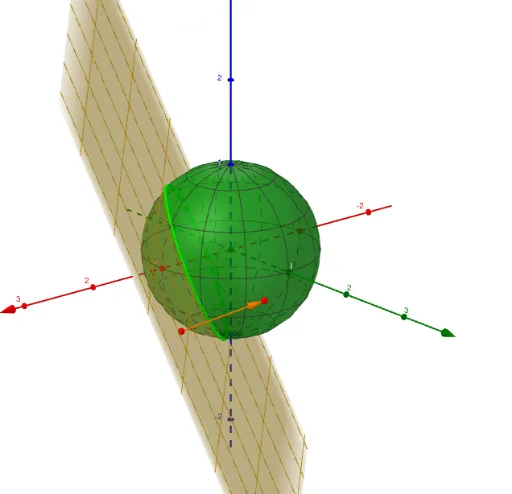
This GeoGebra example demonstrates how to construct an ellipsoid and cut it with a plane to visualize the resulting cross-section curve. The core mathematical concepts include solid geometry (ellipsoid construction), plane-solid intersection, surface area of revolution, and trigonometric parametric equations. Construction details: Use the Surface command to create the ellipsoid surface based on parametric equations, employ the OrthogonalPlane tool to define the cutting plane, use CurveCartesian to plot the intersection curve as a parametric curve, and incorporate Vector tools for dynamic visualization. This example is suitable for high school and university students studying solid geometry, spatial analytic geometry, and applications of definite integrals to cross-sectional areas in calculus.
GeoGebra Commands & Parameters
Surface(((a * cos(u)) * cos(v)), ((b * sin(u)) * cos(v)), (c * sin(v)), u, 0, (2 * π), v, 0, (2 * π)) → dSphere(P1, 1) → ePointIn(e) → P2Vector(P1, P2) → uOrthogonalPlane(P1, u) → fCurveCartesian(d(t2(t), t), t, 0, (2 * π)) → hCurveCartesian(d(t1(t), t), t, 0, (2 * π)) → g
AI Drawing Prompt Reference
Draw a three-dimensional ellipsoid surface defined by parametric equations. Then cut through this ellipsoid with a plane from a certain angle, showing the intersection curve clearly visible in space.
The prompt above was compiled from the original drawing commands and is for reference only.