
Place Value Animation: Visualizing Symbolic Numbers and Place Value Representati
Loading the math board and drawing, please wait…
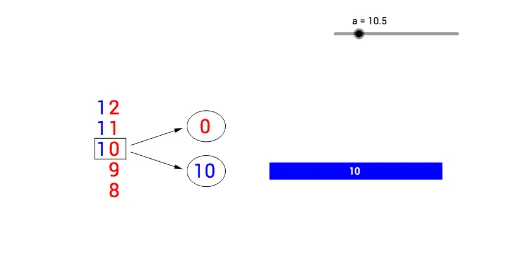
① This example demonstrates an animation that visualizes the relationship between a number written in symbolic form and its place value representation (e.g., ones, tens, hundreds), helping students intuitively grasp the concept of place value. ② The core mathematical concept is the place value system, involving the decomposition and composition of numbers, and the correspondence between digit positions and their values. ③ Construction highlights: The GeoGebra commands used include Sequence, Segment, Vector, and Ellipse; objects include lists list1 through list5, points A through N, vectors u and v, segments b, c, e, f, etc., and texts text1 and text2. The animation likely uses sliders or dynamic updates to change the number and show corresponding place value blocks or arrows. ④ Suitable for upper elementary to early middle school mathematics, this interactive tool is ideal for teaching multi-digit numbers, understanding the base-10 system, and can be used in classroom demonstrations or student self-exploration.
GeoGebra Commands & Parameters
Sequence(If[floor((a + n - 2) / 10) > 0, Text[floor((a + n - 2) / 10), (0, (1.2 * n))], ""], n, 0, 4, 1) → list1Sequence(If[a + n - 2 ≥ 1, Text[floor(Mod[a + n - 2, 10]), (0.7, (1.2 * n))], ""], n, 0, 4, 1) → list2Segment(C, D) → bSegment(D, A) → cSegment(A, B) → eSegment(B, C) → fVector(E, F) → uVector(G, H) → vEllipse(I, J, K) → gEllipse(L, M, N) → hSequence(If[floor(a / 10) > 0, Polygon[(10, 2 - (1.1 * n)), (20, 2 - (1.1 * n)), (20, 1 - (1.1 * n)), (10, 1 - (1.1 * n))], Text[""]], n, 0, floor(a / 10) - 1) → list3Sequence(If[floor(a / 10) > 0, Text[10, (14.6, 1.3 - (1.1 * n))], Text[""]], n, 0, floor(a / 10) - 1) → list4Sequence(If[floor(Mod[a, 10]) > 0, Circle[(10.5 + n, 5), 0.4], Text[""]], n, 0, floor(Mod[a, 10]) - 1) → list5
AI Drawing Prompt Reference
Create a place‑value animation that shows a number in symbolic form together with its tens and ones representation. Draw a rectangle formed by four segments, add two vectors indicating direction, and place an ellipse on each side. Display the tens digit as text on the left and the ones digit on the right. Using a slider‑controlled value, dynamically generate a row of rectangular blocks labeled “10” for each ten, and a row of small circles for each one, with the counts matching the respective digits. All components update in real time to illustrate the decomposition of the number into tens and ones.
The prompt above was compiled from the original drawing commands and is for reference only.