
Place Decimals and Fractions on Number Line
Loading the math board and drawing, please wait…
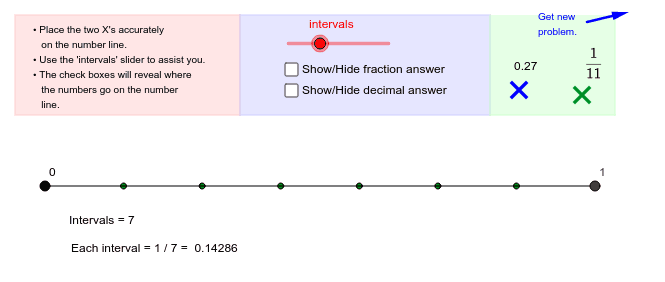
This example demonstrates how to place decimals and fractions on a number line by adjusting intervals. Key math concepts include number line, decimals, fractions, and interval adjustment. It utilizes GeoGebra commands like OrthogonalLine, Circle, Intersect, Segment, Sequence, Random, Polygon, and Vector. Suitable for middle school and above, helping learners understand number line representation and decimal-fraction conversion.
GeoGebra Commands & Parameters
OrthogonalLine(A, yAxis) → aCircle(A, b) → cIntersect(c, a, 1) → BSegment(A, B) → dSequence((x(A) + (i * intervalsize), y(A)), i, 1, intervals) → list1Segment(D, E) → gRandom(2, 12) → denominatorSegment(F, H) → iPolygon(J, K, L, I) → poly1, j_1, k_1, l, i_1Polygon(K, M, N, L) → poly2, k_2, m, n, l_1Polygon(M, O, P, N) → poly3, m_1, o, p, n_1Vector(Q, R) → u
AI Drawing Prompt Reference
Draw a horizontal number line with equally spaced points, represent random fractions and decimals as circles of different sizes on the line, connect points to the line to form segments, and use polygons to combine these segments, demonstrating the placement of fractions and decimals on the number line.
The prompt above was compiled from the original drawing commands and is for reference only.