
Personae of a Circle V1.1
Loading the math board and drawing, please wait…
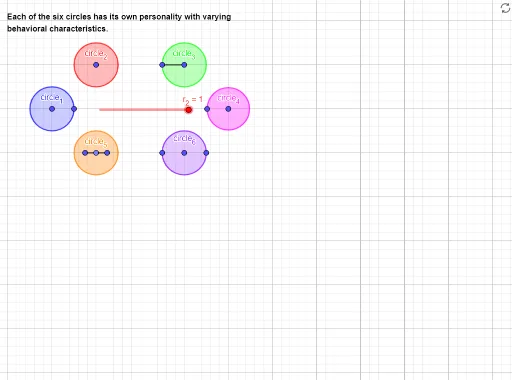
This example demonstrates six circles with varying behavioral characteristics. It involves core concepts of circles, geometry, and coordinate geometry. Using GeoGebra commands such as Semicircle, Circle, Segment, and Point, different types of circles can be constructed. Suitable for middle school and above students or teachers for geometry teaching and exploration.
GeoGebra Commands & Parameters
Semicircle(P_{06b}, P_{06c}) → circle_7Semicircle(P_{06c}, P_{06b}) → circle_{6a}Circle(P_{01a}, P_{01b}) → circle_1Circle(P_{04a}, Segment[P_{04b}, P_{04a}]) → circle_4Segment(P_{05c}, P_{05b}) → seg_{05}Point(seg_{05}) → P_{05a}Circle(P_{05a}, seg_{05}) → circle_5Segment(P_{03a}, P_{03b}) → seg_{03}Circle(P_{03a}, P_{03b}) → circle_3Circle(P_{02a}, r_2) → circle_2
AI Drawing Prompt Reference
Draw a semicircle with points A and B as the diameter, then draw another semicircle with points C and D as the diameter. Next, draw a circle with points E and F as the diameter, followed by a circle with points G and line segment H as the diameter. Then, draw a circle with points I and J as the diameter, and finally, draw a circle with point K as the center and line segment L as the radius.
The prompt above was compiled from the original drawing commands and is for reference only.