
Perpendicular Lines to an Ellipse and an Oval
Loading the math board and drawing, please wait…
In collections
circles, ovals, ellipses and architecture
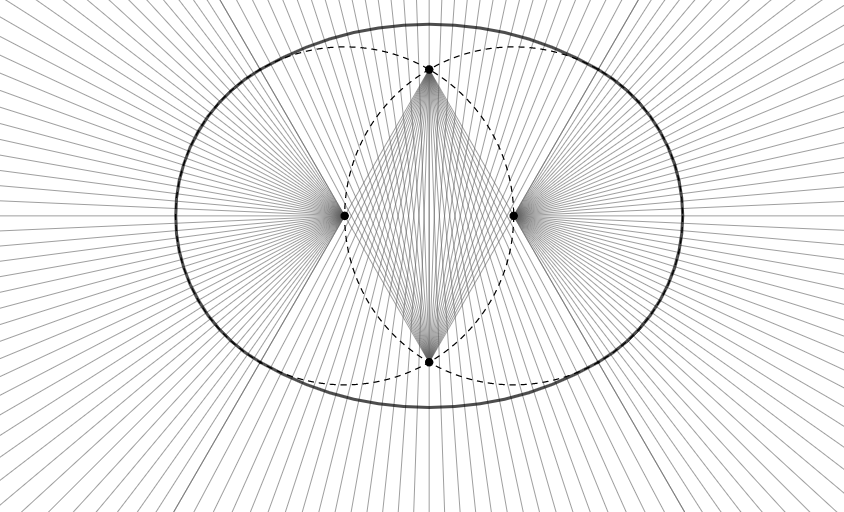
This example demonstrates the intersection points of perpendicular lines to an ellipse and an oval. Key mathematical concepts include the properties of ellipses and the definition of perpendicular lines. Using GeoGebra commands such as Point, Circle, Intersect, and Line, the construction of ellipses and ovals, and the drawing of their perpendicular lines are illustrated. Suitable for high school mathematics education and learning coordinate geometry.
GeoGebra Commands & Parameters
Point(xAxis) → APoint(xAxis) → BCircle(A, B) → cCircle(B, A) → dIntersect(c, d, 2) → CIntersect(c, d, 1) → DLine(D, A) → fLine(C, A) → gLine(C, B) → hLine(D, B) → iIntersect(c, g, 2) → EIntersect(d, h, 2) → FIntersect(c, f, 2) → GIntersect(d, i, 2) → HCircleArc(C, F, E) → eCircleArc(D, G, H) → kCircleArc(A, E, G) → pCircleArc(B, H, F) → qAngle(E, A, G) → αAngle(F, C, E) → βSequence(Ray[A, Rotate[E, (nn * 2.5°), A]], nn, 0, 48) → l1Mirror(l1, yAxis) → l1'Sequence(Ray[C, Rotate[F, (nn * 2°), C]], nn, 0, 30) → l2Mirror(l2, xAxis) → l2'
AI Drawing Prompt Reference
Draw an ellipse and an oval, highlighting their perpendicular lines. Start by creating two intersecting circles and identifying their intersection points. From these points, draw lines perpendicular to both the ellipse and the oval. Connect the endpoints of these lines with arcs to form closed shapes. Finally, add multiple rotating rays originating from the centers of the ellipse and oval to illustrate the symmetry of the perpendicular lines.
The prompt above was compiled from the original drawing commands and is for reference only.