
Permutation & Combination Calculator
Loading the math board and drawing, please wait…
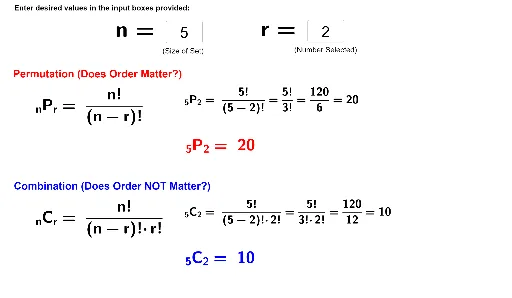
This example demonstrates how to calculate permutations and combinations using GeoGebra. The core math concepts involved include permutation number and combination number. Construction highlights: based on the 'Construction Summary' below, it utilizes GeoGebra commands/objects such as Textfield, n, r, InputBox1, InputBox2, text1, text2, perm, combo, text5, text6, text3, text4, text7, text8, text9, text10, text11. Suitable for high school students learning probability and statistics.
GeoGebra Commands & Parameters
Textfield(n) → InputBox1Textfield(r) → InputBox2
AI Drawing Prompt Reference
Create a permutation and combination calculator with two input boxes for n and r, then calculate and display the permutation and combination results based on the inputs. First, create two text fields named n and r, then create input boxes for n and r, and finally calculate and display the permutation and combination results.
The prompt above was compiled from the original drawing commands and is for reference only.