
Peripheral Angle Bisector
Loading the math board and drawing, please wait…
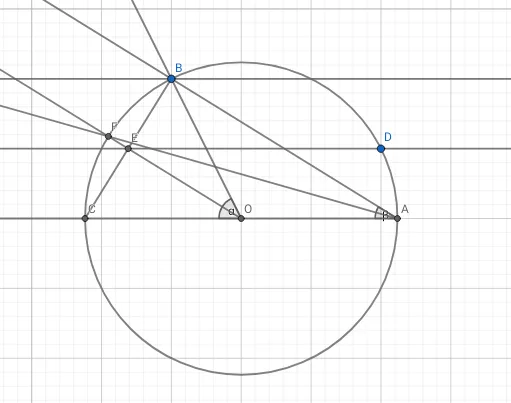
This example demonstrates the geometric properties and construction method of a peripheral angle bisector in a circle. Key math concepts involved include circles, angles, geometric constructions, and logical reasoning. The construction utilizes GeoGebra commands and objects such as Intersect (intersection), Circle, Ray, Angle, Segment, Point, and Line as summarized. It is suitable for high school students learning about circle geometry, mathematical competitions, or enrichment activities.
GeoGebra Commands & Parameters
Intersect(xAxis, yAxis) → OCircle(O, B) → cIntersect(c, xAxis, 2) → AIntersect(c, xAxis, 1) → CRay(A, C) → fRay(A, B) → gRay(O, B) → hAngle(B, O, C) → αAngle(B, A, C) → βSegment(B, C) → iPoint(c) → DLine(D, f) → jIntersect(j, i) → ERay(O, E) → kIntersect(c, k, 1) → FRay(A, F) → lLine(B, f) → m
AI Drawing Prompt Reference
Draw a circle with center at the origin and radius of one unit. Take two points A and C on the circle, one above and one below. Draw the ray from A to C, which intersects the circle at point B. Draw the ray from the center O to point B. Calculate the angle between points B, O, and C. Draw the line segment from B to O and the ray from O to B. Find the intersection point E of these lines. Then draw a ray from O to intersect the circle at point F. Finally, draw the line from B to the ray f. The overall figure shows the circle, angles, and rays, suitable for learning geometric constructions.
The prompt above was compiled from the original drawing commands and is for reference only.