
Perpendicular Bisectors Exercise
Loading the math board and drawing, please wait…
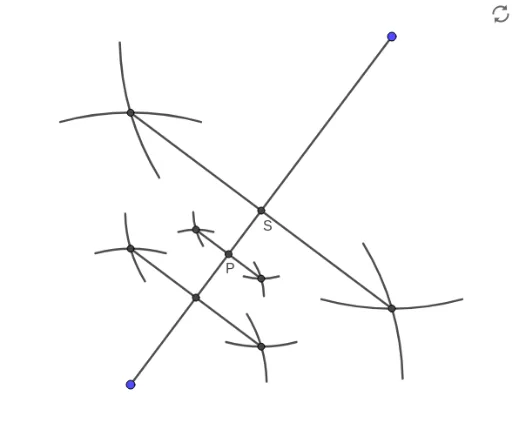
This example demonstrates how to construct triangles and circles using perpendicular bisectors. The core math concepts involved include geometric constructions, triangle properties, and circle properties. Construction highlights utilize GeoGebra commands such as Segment, LineBisector, Circle, Intersect, Rotate, CircleArc; objects include M, N, f, C, g, c, D, E, E', E'_1, D', D'_1, E'_2, E'_3, D'_2, D'_3, d, e, h, k, F, G, i, S, A, p, j, B, H, H', B', H'_1, B'_1, H'_2, B'_2, H'_3, B'_3, q, r, s. Suitable for high school mathematics teaching and geometric construction learning.
GeoGebra Commands & Parameters
Segment(M, N) → fLineBisector(f) → gCircle(M, C) → cIntersect(c, g) → D, ERotate(E, 15°, M) → E'Rotate(E, (-(15°)), M) → E'_1Rotate(D, 15°, M) → D'Rotate(D, (-(15°)), M) → D'_1Rotate(E, 15°, N) → E'_2Rotate(E, (-(15°)), N) → E'_3Rotate(D, 15°, N) → D'_2Rotate(D, (-(15°)), N) → D'_3CircleArc(M, E'_1, E') → dCircleArc(N, E'_3, E'_2) → eCircleArc(M, D'_1, D') → hCircleArc(N, D'_3, D'_2) → kIntersect(h, k, 1) → FIntersect(d, e, 1) → GSegment(F, G) → iIntersect(i, f) → SCircle(M, A) → pLineBisector(M, S) → jIntersect(p, j) → B, HRotate(H, 15°, M) → H'Rotate(B, 15°, M) → B'Rotate(H, 15°, S) → H'_1Rotate(B, 15°, S) → B'_1Rotate(H, (-(15°)), M) → H'_2Rotate(B, (-(15°)), M) → B'_2Rotate(H, (-(15°)), S) → H'_3Rotate(B, (-(15°)), S) → B'_3CircleArc(M, B'_2, B') → qCircleArc(M, H'_2, H') → rCircleArc(S, H'_3, H'_1) → sCircleArc(S, B'_3, B'_1) → tIntersect(q, t, 1) → IIntersect(r, s, 1) → JSegment(I, J) → lIntersect(f, l) → KCircle(K, L) → c_1LineBisector(K, S) → mIntersect(c_1, m) → O, P_1Rotate(P_1, 15°, K) → P'Rotate(O, 15°, K) → O'Rotate(P_1, 15°, S) → P'_1Rotate(O, 15°, S) → O'_1Rotate(P_1, (-(15°)), K) → P'_2Rotate(O, (-(15°)), K) → O'_2Rotate(P_1, (-(15°)), S) → P'_3Rotate(O, (-(15°)), S) → O'_3CircleArc(K, O'_2, O') → d_1CircleArc(K, P'_2, P') → e_1CircleArc(S, P'_3, P'_1) → f_1CircleArc(S, O'_3, O'_1) → g_1Intersect(d_1, g_1, 1) → QIntersect(e_1, f_1, 1) → RSegment(Q, R) → nIntersect(f, n) → P
AI Drawing Prompt Reference
Draw a triangle and its perpendicular bisectors, then create circles centered at the triangle's vertices. Find the intersections of these circles with the bisectors. Rotate these intersection points to generate new ones, connect some to form segments, and draw arcs using these segments. Finally, connect the intersection points of the arcs to complete the figure, demonstrating the properties of perpendicular bisectors and circles.
The prompt above was compiled from the original drawing commands and is for reference only.