
Constructing a Right Triangle by Nenad Đapić
Loading the math board and drawing, please wait…
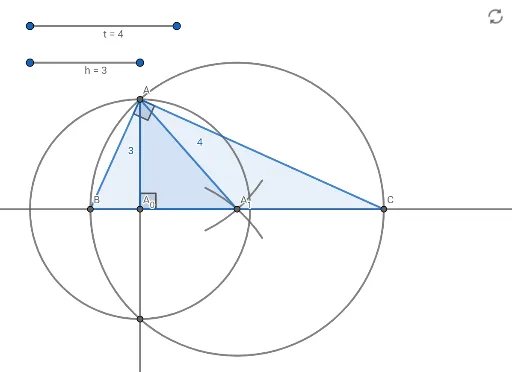
This example demonstrates how to construct a right triangle given the height corresponding to the hypotenuse (3cm) and the median line. The core math concepts involved include right triangles, height, centroid, and geometric constructions. The construction uses GeoGebra commands such as Point, Segment, Intersect, Circle, Ray, Rotate, CircleArc, Polygon, Angle, and Line. Suitable for high school students learning geometric constructions.
GeoGebra Commands & Parameters
Point(Circle[P, 3]) → QSegment(P, Q) → hPoint(Circle[R, 4]) → SSegment(R, S) → tIntersect(xAxis, yAxis) → A_{0}Circle(A_{0}, h) → cIntersect(c, yAxis, 2) → ARay(A, A_{0}) → fIntersect(c, f, 2) → TCircle(A, t) → dCircle(T, t) → eIntersect(d, e, 1) → URotate(U, 15°, A) → B'Rotate(U, (-(15°)), A) → B'_1CircleArc(A, B'_1, B') → gRotate(U, 15°, T) → B'_2Rotate(U, (-(15°)), T) → B'_3CircleArc(T, B'_3, B'_2) → kIntersect(g, k, 1) → A_{1}Polygon(A, A_{0}, A_{1}) → t1, a_{1}, a, a_{0}Angle(A_{1}, A_{0}, A) → αLine(A_{1}, A_{0}) → iCircle(A_{1}, t) → pIntersect(p, i, 2) → BIntersect(p, i, 1) → CPolygon(A, B, C) → t2, d_1, a_2, c_1Angle(C, A, B) → β
AI Drawing Prompt Reference
Draw a right triangle with a given height of 3 cm for the hypotenuse and median line. Start by constructing the hypotenuse and its height, then use the median and circle properties to find the right-angle vertex. Next, construct the other two vertices of the triangle by rotating and finding midpoints, and finally connect the three vertices to form the triangle, labeling the right angle and relationships between the sides.
The prompt above was compiled from the original drawing commands and is for reference only.