
Perimeter of Shape F: Geometric Construction and Measurement
Loading the math board and drawing, please wait…
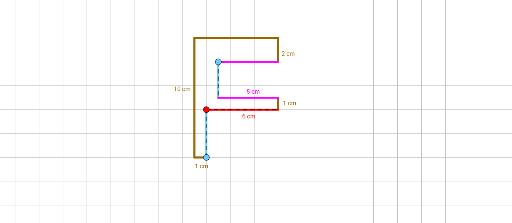
This GeoGebra example demonstrates the calculation of the perimeter of a complex planar shape labeled 'F', constructed from multiple line segments and points. The core mathematical concept is the perimeter of polygons, defined as the sum of the lengths of all boundary segments. The construction uses the Point command to create numerous key points (e.g., A, B, C, D, etc.) and the Segment command to connect them into boundary segments (e.g., γ, α, β, f, g, h, etc.), forming the overall shape. This example is suitable for middle or high school students learning geometry, perimeter measurement, and dynamic geometry software usage. By manipulating points or observing segment lengths, students can intuitively explore how the perimeter changes with shape modifications and practice fundamental GeoGebra construction tools.
GeoGebra Commands & Parameters
Point(Circle[A, 10]) → BSegment(A, B) → fPoint(Circle[C, 7]) → DSegment(C, D) → gPoint(Circle[E, 2]) → FSegment(E, F) → hPoint(Circle[G, 1]) → HSegment(G, H) → iPoint(Circle[I, 1]) → JSegment(I, J) → jPoint(Circle[K, 5]) → LSegment(K, L) → kPoint(Circle[M, 6]) → NSegment(M, N) → lPoint(Circle[O, 3]) → PSegment(O, P) → mPoint(Circle[Q, 4]) → RSegment(Q, R) → nPoint(Circle[S, 5]) → TSegment(S, T) → pPoint(i) → USegment(U, V) → qPoint(j) → WSegment(V, W) → rPoint(k) → ZPoint(p) → A_1Segment(Z, A_1) → s