
Perimeter of Regular Polygons
Loading the math board and drawing, please wait…
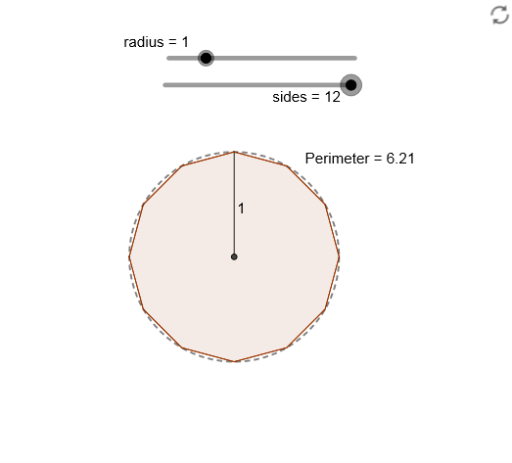
This example demonstrates the calculation of the perimeter of regular polygons. Key mathematical concepts include polygons and geometric construction. Using GeoGebra commands such as Intersect, Dilate, Rotate, and Polygon, you can dynamically construct regular polygons and observe changes in their perimeters. Suitable for middle school and above students to learn about the properties of polygons and geometric construction.
GeoGebra Commands & Parameters
Intersect(xAxis, yAxis) → APoint(yAxis) → BDilate(A, radius + 1, B) → A'Segment(A, A') → fRotate(A', (360 * ° / sides), A) → A''Polygon(A', A'', sides) → Polygon, g, q, r, s, C, D, E, F, G, H, I, h, J, K, L, i, j, k, l, m, n, pCircle(A, radius) → cPerimeter(Polygon) → perimeterpoly1PointIn(Polygon) → Pointpoly1_1Perimeter(Polygon) → aPointIn(Polygon) → Pointpoly1
AI Drawing Prompt Reference
Draw a regular polygon by first determining a point A on the coordinate axes, then creating a circle c with A as the center and the distance to the origin B as the radius. Next, dilate point A by a factor of 1 to get point A', and connect A and A' to form segment f. Then, rotate point A' around A to form point A'', and use A'' to construct a regular polygon g. Observe and calculate the perimeter of the polygon.
The prompt above was compiled from the original drawing commands and is for reference only.