
Perimeter and Area Calculation by cemccourseware
Loading the math board and drawing, please wait…
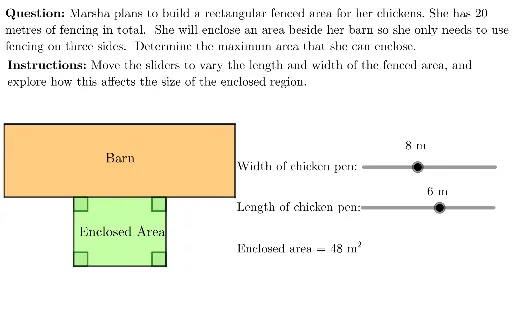
This example demonstrates how to use GeoGebra to draw and calculate the perimeter and area of polygons; involves core math concepts like perimeter, area, coordinate geometry, optimization problems, trigonometry, and conic sections; construction highlights include commands/objects like Point, UnicodeToLetter, Line, Intersect, Polygon, Segment, LaTeX, Angle; suitable for high school students and teachers.
GeoGebra Commands & Parameters
Point(Circle[B, 20]) → FUnicodeToLetter(10007) → xmarkUnicodeToLetter(10003) → cmarkLine(A, xAxis) → lLine(A, yAxis) → bLine(B, yAxis) → cLine(B, xAxis) → dLine(C, xAxis) → eLine(D, yAxis) → fIntersect(e, f) → EPolygon(A, C, E, D) → chickenPen, a, c_1, e_1, d_1Segment(B, F) → hIntersect(l, c) → GLine(F, yAxis) → gIntersect(l, g) → HPolygon(B, G, H, F) → barn, b_1, g_1, h_1, f_1LaTeX("\text{\textbf{Instructions: }Move the sliders to vary the length and width of the fenced area, and \\explore how this affects the size of the enclosed region.}") → SpecInstrucAngle(A, D, E) → αAngle(C, A, D) → βAngle(D, E, C) → γAngle(E, C, A) → δ