
Perfect Square Visualization
Loading the math board and drawing, please wait…
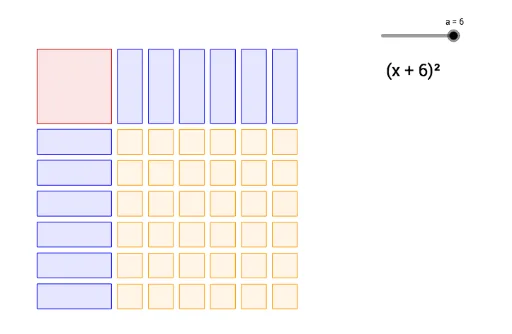
This activity allows students to visualize the relationship between the symbolic form of a perfect square and its area model. Key mathematical concepts include perfect square formulas and area models. Using GeoGebra commands like Polygon and Sequence, the construction process of a perfect square is dynamically demonstrated. Suitable for middle school and above students learning algebra and geometry.
GeoGebra Commands & Parameters
Polygon(A, B, D, C) → poly1, a_1, b, d, cSequence(Polygon[(3.25 + (1.25 * n), 3), (4.25 + (1.25 * n), 3), (4.25 + (1.25 * n), 0), (3.25 + (1.25 * n), 0)], n, 0, a - 1, 1) → list1Sequence(Polygon[(0, -0.25 - (1.25 * n)), (0, -1.25 - (1.25 * n)), (3, -1.25 - (1.25 * n)), (3, -0.25 - (1.25 * n))], n, 0, a - 1, 1) → list2Sequence(Sequence[Polygon[(3.25 + (1.25 * n), -0.25 - (1.25 * m)), (4.25 + (1.25 * n), -0.25 - (1.25 * m)), (4.25 + (1.25 * n), -1.25 - (1.25 * m)), (3.25 + (1.25 * n), -1.25 - (1.25 * m))], n, 0, a - 1, 1], m, 0, a - 1, 1) → list3
AI Drawing Prompt Reference
Draw a visualization of a perfect square. Start with a large square whose side length is determined by a parameter a. To the right of this square, place a vertical column of a small rectangles, each with width 1.25 and height equal to the large square's side. Below the large square, place a horizontal row of a small rectangles, each with height 1.25 and width equal to the large square's side. In the bottom-right corner, create an a by a grid of small squares, each with side length 1.25. The overall figure shows a large square decomposed into parts, illustrating the geometric meaning of a perfect square formula.
The prompt above was compiled from the original drawing commands and is for reference only.