
Pentomino Set
Loading the math board and drawing, please wait…
In collections
Elementary Geometry
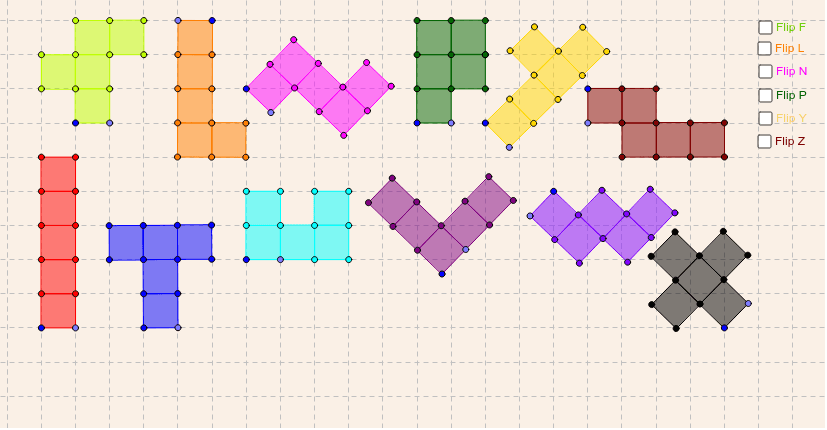
This example demonstrates the manipulation and transformation of pentomino shapes. It involves core math concepts like geometric tiling, area calculation, and symmetry analysis. Construction uses commands such as Point, Segment, F, Fflip, L, Lflip, I, P, Pflip, N, Nflip, T, U, W, Y, Yflip, Z, Zflip, X, V for creating and flipping pentominoes. Suitable for middle school and above for geometry learning and spatial reasoning.
GeoGebra Commands & Parameters
Point(Circle[A, 1]) → BSegment(A, B) → aPoint(Circle[C, 1]) → DSegment(C, D) → bPoint(Circle[E, 1]) → FSegment(E, F) → cPoint(Circle[G, 1]) → HSegment(G, H) → dPoint(Circle[I, 1]) → JSegment(I, J) → ePoint(Circle[K, 1]) → LSegment(K, L) → fPoint(Circle[M, 1]) → NSegment(M, N) → gPoint(Circle[O, 1]) → PSegment(O, P) → hPoint(Circle[Q, 1]) → RSegment(Q, R) → iPoint(Circle[S, 1]) → TSegment(S, T) → jPoint(Circle[U, 1]) → VSegment(U, V) → kPoint(Circle[W, 1]) → ZSegment(W, Z) → lPoint(Circle[A_1, 1]) → B_1Segment(A_1, B_1) → mPoint(Circle[C_1, 1]) → D_1Segment(C_1, D_1) → nPoint(Circle[E_1, 1]) → F_1Segment(E_1, F_1) → pPoint(Circle[G_1, 1]) → H_1Segment(G_1, H_1) → qPoint(Circle[I_1, 1]) → J_1Segment(I_1, J_1) → rPoint(Circle[K_1, 1]) → L_1Segment(K_1, L_1) → sF(A, B) → poly1, poly2, R_1, S_1, T_1, U_1, V_1, poly3, poly4, poly5, M_1, N_1, O_1, P_1, Q_1Fflip(A_1, B_1) → poly6, poly7, D_2, E_2, F_2, G_2, H_2, poly8, poly9, poly10, W_1, Z_1, A_2, B_2, C_2L(C, D) → poly11, poly12, N_2, O_2, P_2, Q_2, R_2, poly13, poly14, poly15, I_2, J_2, K_2, L_2, M_2Lflip(C_1, D_1) → poly16, poly17, Z_2, A_3, B_3, C_3, D_3, poly18, poly19, poly20, S_2, T_2, U_2, V_2, W_2I(M, N) → poly21, poly22, J_3, K_3, L_3, M_3, N_3, poly23, poly24, poly25, E_3, F_3, G_3, H_3, I_3P(E, F) → poly26, poly27, T_3, U_3, V_3, W_3, Z_3, poly28, poly29, poly30, O_3, P_3, Q_3, R_3, S_3Pflip(E_1, F_1) → A_4, B_4, poly31, poly32, poly33, poly34, poly35, C_4, D_4, E_4, F_4, G_4, H_4, I_4, J_4N(G, H) → K_4, L_4, poly36, poly37, poly38, poly39, poly40, M_4, N_4, O_4, P_4, Q_4, R_4, S_4, T_4Nflip(G_1, H_1) → U_4, V_4, poly41, poly42, poly43, poly44, poly45, W_4, Z_4, A_5, B_5, C_5, D_5, E_5, F_5T(S, T) → G_5, H_5, poly46, poly47, poly48, poly49, poly50, I_5, J_5, K_5, L_5, M_5, N_5, O_5, P_5U(U, V) → Q_5, R_5, poly51, poly52, poly53, poly54, poly55, S_5, T_5, U_5, V_5, W_5, Z_5, A_6, B_6W(W, Z) → C_6, D_6, poly56, poly57, poly58, poly59, poly60, E_6, F_6, G_6, H_6, I_6, J_6, K_6, L_6Y(I, J) → poly61, poly62, R_6, S_6, T_6, U_6, V_6, poly63, poly64, poly65, M_6, N_6, O_6, P_6, Q_6Yflip(I_1, J_1) → poly66, poly67, D_7, E_7, F_7, G_7, H_7, poly68, poly69, poly70, W_6, Z_6, A_7, B_7, C_7Z(K, L) → I_7, J_7, poly71, poly72, poly73, poly74, poly75, K_7, L_7, M_7, N_7, O_7, P_7, Q_7, R_7Zflip(K_1, L_1) → S_7, T_7, poly76, poly77, poly78, poly79, poly80, U_7, V_7, W_7, Z_7, A_8, B_8, C_8, D_8X(O, P) → E_8, F_8, poly81, poly82, poly83, poly84, poly85, G_8, H_8, I_8, J_8, K_8, L_8, M_8, N_8V(Q, R) → O_8, P_8, poly86, poly87, poly88, poly89, poly90, Q_8, R_8, S_8, T_8, U_8, V_8, W_8, Z_8
AI Drawing Prompt Reference
Draw a set of pentomino shapes, each consisting of five connected line segments, showcasing various geometric forms. Start by creating multiple base line segments, then rotate and flip them to form different pentomino shapes like F, L, I, etc., ultimately presenting a collection of diverse pentominoes that highlight geometric tiling and symmetry.
The prompt above was compiled from the original drawing commands and is for reference only.