
Pentagram Construction
Loading the math board and drawing, please wait…
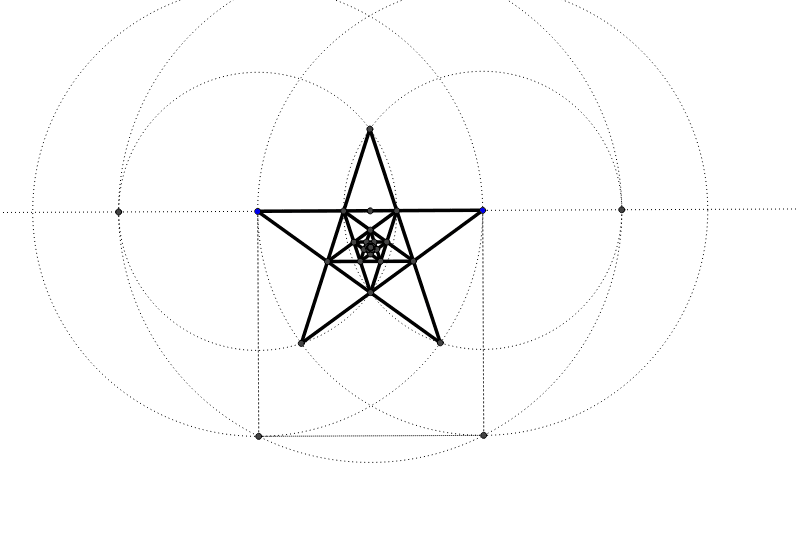
This example demonstrates how to construct a pentagram using basic geometric tools. It involves core concepts like polygon construction, line and circle intersections. Key GeoGebra commands used include Segment, Circle, Polygon, Midpoint, Line, and Intersect. Suitable for middle school students learning geometric constructions and fundamental shapes.
GeoGebra Commands & Parameters
Segment(A, B) → aCircle(A, B) → cCircle(B, A) → dPolygon(B, A, 4) → poly1, b, e, f, g, C, DMidpoint(A, B) → ECircle(E, C) → hLine(A, B) → iIntersect(h, i, 1) → FIntersect(h, i, 2) → GCircle(B, G) → kCircle(A, F) → pIntersect(k, p, 2) → HIntersect(d, p, 1) → IIntersect(c, k, 2) → JSegment(H, I) → jSegment(I, B) → lSegment(A, J) → mSegment(J, H) → nIntersect(i, a) → KIntersect(j, i) → LIntersect(m, j) → MIntersect(m, l) → NIntersect(n, l) → OIntersect(i, a) → PIntersect(n, i) → QSegment(L, N) → qSegment(N, Q) → rSegment(Q, M) → sSegment(M, O) → tSegment(O, L) → a_1Intersect(q, s) → RIntersect(q, t) → SIntersect(t, r) → TIntersect(r, a_1) → UIntersect(a_1, s) → VSegment(V, S) → b_1Segment(S, U) → c_1Segment(U, R) → d_1Segment(R, T) → e_1Segment(T, V) → f_1Intersect(b_1, d_1) → WIntersect(b_1, e_1) → ZIntersect(c_1, e_1) → A_1Intersect(c_1, f_1) → B_1Intersect(d_1, f_1) → C_1Segment(W, A_1) → g_1Segment(A_1, C_1) → h_1Segment(C_1, Z) → i_1Segment(Z, B_1) → j_1Segment(B_1, W) → k_1Intersect(i_1, k_1) → D_1Intersect(g_1, i_1) → E_1Intersect(g_1, j_1) → F_1Intersect(h_1, j_1) → G_1Intersect(h_1, k_1) → H_1Segment(D_1, F_1) → l_1Segment(F_1, H_1) → m_1Segment(H_1, E_1) → n_1Segment(E_1, G_1) → p_1Segment(G_1, D_1) → q_1Intersect(l_1, n_1) → I_1Intersect(l_1, p_1) → J_1Intersect(m_1, p_1) → K_1Intersect(m_1, q_1) → L_1Intersect(n_1, q_1) → M_1Segment(I_1, K_1) → r_1Segment(K_1, M_1) → s_1Segment(M_1, J_1) → t_1Segment(J_1, L_1) → a_2Segment(L_1, I_1) → b_2Intersect(t_1, b_2) → N_1Intersect(r_1, t_1) → O_1Intersect(r_1, a_2) → P_1Intersect(s_1, a_2) → Q_1Intersect(s_1, b_2) → R_1Segment(N_1, P_1) → c_2Segment(P_1, R_1) → d_2Segment(R_1, O_1) → e_2Segment(O_1, Q_1) → f_2Segment(Q_1, N_1) → g_2
AI Drawing Prompt Reference
Draw a pentagram by first creating two line segments and two circles, then use their intersections to get five vertices and connect them to form a regular pentagon. Next, find the midpoint of the segments and draw circles centered there, intersecting the previous circles to locate new points. Finally, connect these points to create the inner decorative lines of the pentagram, resulting in a complete star shape.
The prompt above was compiled from the original drawing commands and is for reference only.