
Partial Fraction Decomposition: Challenging Linear Factors
Loading the math board and drawing, please wait…
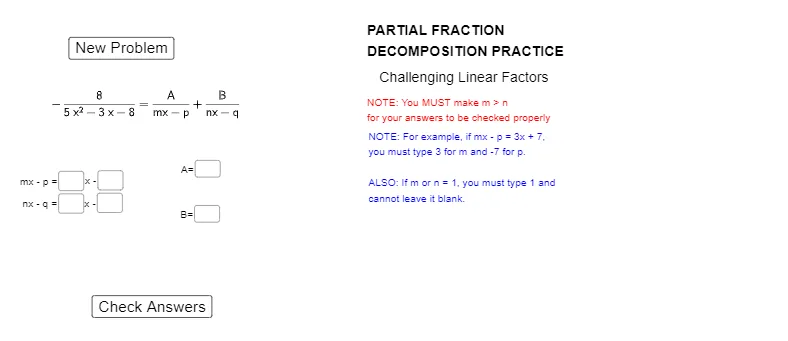
This GeoGebra example uses an interactive setup to demonstrate how partial fraction decomposition works for rational functions with linear factors, focusing on cases that make coefficient identification more challenging. It connects the algebraic decomposition process to visual behavior in function graphs, highlighting how the chosen coefficients influence features such as hyperbola-like branches and overall graph shape. The key mathematical concepts are rational function decomposition, the correct form for linear factors, solving for unknown coefficients, and validating results under constraints (implemented via conditional logic). Construction-wise, Random and RandomDiscrete generate parameter candidates; If together with Max and Min filters acceptable values. Polynomial is used to build the relevant numerator/denominator expressions, while Textfield and Text display prompts and computed outcomes. Learners enter guesses through multiple InputBox objects (InputBox1–InputBox6), and the script compares them to correctA and other computed references (e.g., mguess/nguess and maxP/maxQ), with feedback text objects and buttons (button1/button2) controlling generation and checking. Suitable for advanced secondary education and early university courses in algebra and functions, especially for practice and visualization-based understanding of partial fractions.
GeoGebra Commands & Parameters
Random(-9, 11) → aRandomDiscrete({1, 2, 3, 4}, {8, 5, 3, 1}) → kRandomDiscrete({2, 3, 4, 5}, {6, 4, 3, 2}) → mIf(m > k, k, 1) → nRandom(-9, 11) → bIf(a ≟ b, b + 1, b) → cRandomDiscrete({-3, -2, -1, 0, 1, 2, 3, 4, 5, 6, 7, 8}, {2, 2, 4, 16, 4, 4, 4, 2, 2, 1, 1, 1}) → dRandom(-10, 10) → fIf(d ≟ 0, f, (d * x) + f) → hPolynomial((((m * x) - a) * ((n * x) - c))) → gTextfield(p) → InputBox1Textfield(q) → InputBox2Textfield(A) → InputBox3Textfield(B) → InputBox4Max({a, c}) → maxPMin({a, c}) → maxQTextfield(mguess) → InputBox5Textfield(nguess) → InputBox6
AI Drawing Prompt Reference
Create an interactive graph demonstrating partial fraction decomposition for rational functions with linear factors. Randomly generate coefficients for the numerator and denominator, displayed in text fields for user input. Use sliders and buttons to control the generation and verification process, highlighting the difference between user guesses and the correct answer with colored lines. The graph should show the function's behavior, dynamically updating to illustrate how coefficient changes affect the overall shape and features like hyperbolic branches.
The prompt above was compiled from the original drawing commands and is for reference only.