
Geometry Transformations - Draw the Answer
Loading the math board and drawing, please wait…
In collections
A Plethora of Practice Problems
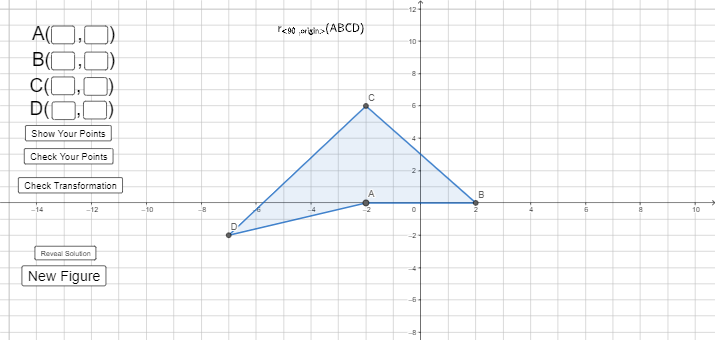
This example demonstrates how to draw the answer using geometric transformations. The key mathematical concepts involved include transformations, coordinate systems, and geometric construction. The construction involves GeoGebra commands such as Random, Translate, Rotate, and objects like y_a, x_a, button1, etc. It is suitable for middle or high school mathematics learning to understand the principles and applications of geometric transformations.
GeoGebra Commands & Parameters
Random(-2, 2) → a_{1}Random(-2, 2) → b_{1}RandomDiscrete({0, π / 2, π, ((3 * π)) / 2}, {2, 1, 1, 1}) → r_{1}Translate(W, (a_{1}, b_{1})) → A_{1}Translate(X, (a_{1}, b_{1})) → B_{1}Translate(Y, (a_{1}, b_{1})) → C_{1}Translate(Z, (a_{1}, b_{1})) → D_{1}Rotate(A_{1}, r_{1}) → ARotate(B_{1}, r_{1}) → BRotate(C_{1}, r_{1}) → CRotate(D_{1}, r_{1}) → DRandom(1, 2) → whatweseeIf(whatwesee ≟ 1, Polygon[A, B, C], whatwesee ≟ 2, Polygon[A, B, C, D]) → polyTextfield(x_{a}) → InputBox1Textfield(y_{a}) → InputBox2Textfield(x_{b}) → InputBox3Textfield(y_{b}) → InputBox4Textfield(x_{c}) → InputBox5Textfield(y_{c}) → InputBox6Textfield(x_{d}) → InputBox7Textfield(y_{d}) → InputBox8Random(-5, 5) → aRandom(-5, 5) → b_{hi}If(b_{hi} ≟ 0 ∧ a ≟ 0, b_{hi} + 2, b_{hi}) → bRandomDiscrete({1, 2, 3, 4}, {2, 2, 1, 1}) → typeRandomDiscrete({π / 2, π, ((3 * π)) / 2}, {1, 1, 1}) → rRandom(-5, 5) → cIf(type ≟ 1, Translate[A, (a, b)], type ≟ 2, Rotate[A, r], type ≟ 3, Mirror[A, x = c], type ≟ 4, Mirror[A, y = c]) → AprimeIf(type ≟ 1, Translate[B, (a, b)], type ≟ 2, Rotate[B, r], type ≟ 3, Mirror[B, x = c], type ≟ 4, Mirror[B, y = c]) → BprimeIf(type ≟ 1, Translate[C, (a, b)], type ≟ 2, Rotate[C, r], type ≟ 3, Mirror[C, x = c], type ≟ 4, Mirror[C, y = c]) → CprimeIf(type ≟ 1, Translate[D, (a, b)], type ≟ 2, Rotate[D, r], type ≟ 3, Mirror[D, x = c], type ≟ 4, Mirror[D, y = c]) → DprimeIf(whatwesee ≟ 1, Polygon[Aprime, Bprime, Cprime], whatwesee ≟ 2, Polygon[Aprime, Bprime, Cprime, Dprime]) → polyprimeText(If[whatwesee ≟ 1, "ΔABC", whatwesee ≟ 2, "ABCD"]) → text11
AI Drawing Prompt Reference
Draw a geometry transformation exercise: first randomly generate a triangle or quadrilateral (formed by four points, possibly displayed as a triangle or quadrilateral) with random position and rotation angle. Then apply a random transformation (translation, rotation, reflection about a vertical or horizontal line) to this shape, resulting in a transformed shape. The original shape is shown as a solid polygon, and the transformed shape is shown as a dashed or differently colored polygon. Also display eight input boxes for entering the x and y coordinates of the four original vertices, and a text label indicating the shape type (e.g., 'triangle' or 'quadrilateral'). The overall layout is clear for students to observe the relationship before and after transformation.
The prompt above was compiled from the original drawing commands and is for reference only.