
Parametric Construction and Geometric Analysis of a Torus
Loading the math board and drawing, please wait…
In collections
My 3D Collection
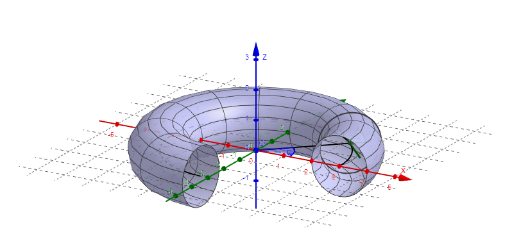
This example demonstrates the generation and geometric properties of a torus in 3D space. The core mathematical concepts involve parametric equations, surfaces of revolution, and differential geometry. The construction utilizes the 'Surface' command to create the main body, 'CurveCartesian' for cross-sectional circles, and the 'Derivative' command to analyze surface slopes and tangents. Key objects include parameters for the major radius R, minor radius r, and the rotation angle $\phi$, along with segments and angles to define the geometry. This model is ideal for high school solid geometry, university multivariable calculus, or computer graphics students to visualize parametric surface logic.
GeoGebra Commands & Parameters
CurveCartesian((R * cos(u)), (R * sin(u)), 0, u, 0, φ) → kSurface(((R + (r * cos(v))) * cos(u)), ((R + (r * cos(v))) * sin(u)), (r * sin(v)), u, 0, φ, v, 0, (2 * π)) → torDerivative(k) → k'Segment(B, C) → bCircle(A, r, b) → cSegment(A, D) → gSegment(A_1, O) → fAngle(D, A, A_1, b) → αAngle(E, O, A_1, zAxis) → β
AI Drawing Prompt Reference
Draw a 3D torus shape. The torus is made of a circular cross-section rotated around an axis. First, draw the circular cross-section, then rotate it to create the torus. Include the internal structure, surface curvature, and angles and line segments. Ensure the shape clearly shows the geometric features and parameter relationships of the torus.
The prompt above was compiled from the original drawing commands and is for reference only.