
Parameterizing an Ellipse: Dynamic Construction and Visualization
Loading the math board and drawing, please wait…
In collections
Multivariable Calculus
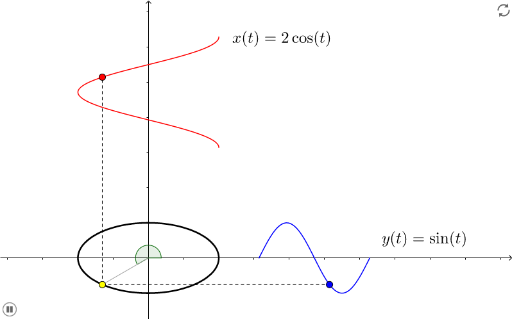
This example demonstrates how to dynamically construct and visualize an ellipse using its parametric equations, showing the motion of a point on the ellipse and the relationships among key geometric elements. Core mathematical concepts include the parametric equation of an ellipse, the parameter angle, foci, semi-major and semi-minor axes, and how parameter changes affect the ellipse's shape and point position. Construction highlights: the GeoGebra command CurveCartesian defines the parametric curve, Segment connects foci to the moving point, Angle marks the parameter angle, and sliders (a, b, α) control the ellipse dimensions and parameter variation; objects include foci F, center O, vertices A and B, moving point E, with text labels displaying values. Suitable for high school analytic geometry or pre-university courses, this example is ideal for learning parametric equations, loci, and dynamic geometry, and for exploring connections between ellipses, trigonometry, and circles.
GeoGebra Commands & Parameters
CurveCartesian((f_1(t), f_2(t)), t, -10, 10) → CCurveCartesian(t + π, f_2((2 * t) + (2 * π)), t, 0, π) → YCurveCartesian(f_1((2 * t) + (2 * π)), t + π, t, 0, π) → XSegment(A, E) → fSegment(A, F) → gAngle(Vector[O, B], Vector[O, A]) → αSegment(O, A) → h