
Parallelograms (Step I)
Loading the math board and drawing, please wait…
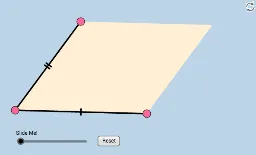
This worksheet provides three quick investigative applets to help students recall the special properties of parallelograms. It demonstrates how parallelograms behave under transformations such as translation and dilation, highlighting relationships among sides, angles, and diagonals. Core mathematical concepts include the definition of a parallelogram, opposite sides parallel and equal, opposite angles equal, diagonals bisecting each other, and vector-based translation. Construction details: using GeoGebra commands like Line, Segment, Polygon to build the base shapes, Vector and Translate to create copies and movements, Dilate to show similarity, and PointIn with sliders for dynamic parameters. Suitable for middle school geometry lessons or self-study, this resource helps students intuitively grasp parallelogram properties and develop dynamic geometric thinking.
GeoGebra Commands & Parameters
Line(A, B) → aSlope(a) → mPointIn(c) → CLine(C, a) → eVector(A, B) → uTranslate(C, u) → C'Segment(A, B) → hSegment(A, C) → dPolygon(A, B, C') → poly1, c', a_1, b_1Polygon(A, C', C) → poly2, c_1, a_2, c'_1Dilate(A, If[0 < k ≤ 1, 1 - k, 0], C) → A'Vector(A, A') → vTranslate(A, v) → A'_1Translate(B, v) → B'Segment(A'_1, B') → h'Dilate(C, If[1 < k ≤ 2, 2 - k, 0], C') → C'_1Vector(C, C'_1) → wTranslate(A, w) → A'_2Translate(C, w) → C'_2Segment(A'_2, C'_2) → d'Polygon(A, B, C', C) → poly3, a_3, b_2, c'_2, c_2