
Parallelogram Problem
Loading the math board and drawing, please wait…
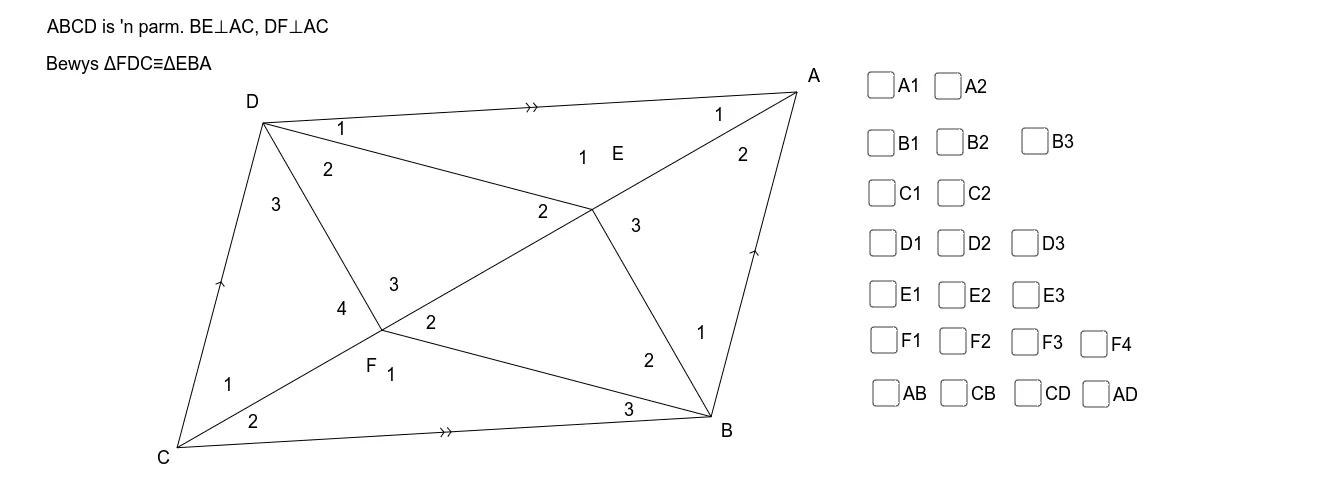
This example demonstrates the basic properties and related problems of a parallelogram. Key mathematical concepts include the definition of a parallelogram, area calculation, and symmetry. Using GeoGebra commands such as Line, Point, Segment, etc., one can construct a parallelogram and explore its geometric properties. Suitable for middle school and above students to learn geometric construction and related concepts.
GeoGebra Commands & Parameters
Line(D, A) → aLine(C_1, a) → bPoint(b) → CLine(D, C) → cLine(A, c) → dSegment(A, C) → eIntersect(b, d) → BSegment(C, B) → gSegment(B, A) → hOrthogonalLine(D, e) → jOrthogonalLine(B, e) → kIntersect(j, e) → FSegment(D, F) → lIntersect(k, e) → GSegment(B, G) → mSegment(D, G) → nSegment(F, B) → pAngle(D, A, C) → αAngle(C, A, B) → βAngle(F, B, C) → γAngle(G, B, F) → δAngle(A, B, G) → εAngle(B, C, A) → ζAngle(A, C, D) → ηAngle(C, D, F) → θAngle(F, D, G) → ιAngle(G, D, A) → κPoint(e) → HPoint(n) → IPoint(e) → JPoint(m) → KPoint(l) → LPoint(e) → MPoint(p) → NPoint(e) → OAngle(H, G, I) → λAngle(K, G, H) → μAngle(I, G, J) → νAngle(M, F, L) → ξAngle(O, F, N) → οAngle(N, F, M) → ρSegment(D, A) → iSegment(C, D) → fDistance(D, C) → distanceADDistance(A, B) → distanceBEDistance(D, A) → distanceABDistance(C, B) → distanceDEDistance(D, A) → i_1Distance(C_1, C) → distanceCDAngle(F, C, D) → σAngle(D, F, C) → τ