
Parallelogram Exploration by Courtney O'Berry
Loading the math board and drawing, please wait…
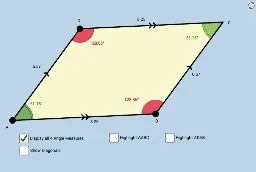
This example demonstrates the geometric properties of a parallelogram through interactive manipulation, helping students intuitively understand concepts like parallel lines, diagonals, angle sums, and symmetry. It involves commands like Segment, Line, Intersect, Midpoint, Angle, Polygon, Mirror in GeoGebra for construction and analysis, suitable for middle school and above for geometry instruction and concept reinforcement.
GeoGebra Commands & Parameters
Segment(A, B) → aSegment(A, D) → bLine(D, a) → cLine(B, b) → dIntersect(c, d) → CSegment(D, C) → eSegment(B, C) → fMidpoint(A, C) → ESegment(A, E) → gSegment(E, C) → hSegment(D, E) → iSegment(E, B) → jAngle(B, A, E) → αAngle(D, C, E) → βAngle(E, A, D) → γAngle(C, B, E) → δAngle(A, D, E) → εAngle(E, B, A) → ζAngle(E, D, C) → ηAngle(E, C, B) → θAngle(C, E, D) → ιPolygon(A, B, C) → poly1, c_1, a_1, b_1Mirror(A, g) → A'Mirror(B, g) → B'Mirror(C, g) → C'Polygon(A', B', C') → poly1', c', a', b'Polygon(A, B, D) → poly2, d_1, a_2, b_2Mirror(A, j) → A'_1Mirror(B, j) → B'_1Mirror(D, j) → D'Polygon(A'_1, B'_1, D') → poly2', d', a'_1, b'_1Angle(B, A, D) → κAngle(A, D, C) → λAngle(D, C, B) → μAngle(C, B, A) → νPolygon(A, B, C, D) → poly3, a_3, b_3, c_2, d_2