
Parallelogram Discovery Template
Loading the math board and drawing, please wait…
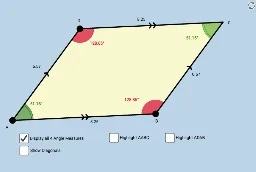
This example demonstrates the dynamic construction and property exploration of a parallelogram. Key math concepts include definition, parallel and equal opposite sides, and bisecting diagonals. Construction involves commands like Segment, Line, Intersect, Midpoint, Angle, Polygon, and Mirror. Suitable for middle school and above students to understand parallelogram properties and transformations.
GeoGebra Commands & Parameters
Segment(A, B) → aSegment(A, D) → bLine(D, a) → cLine(B, b) → dIntersect(c, d) → CSegment(D, C) → eSegment(B, C) → fMidpoint(A, C) → ESegment(A, E) → gSegment(E, C) → hSegment(D, E) → iSegment(E, B) → jAngle(B, A, E) → αAngle(D, C, E) → βAngle(E, A, D) → γAngle(C, B, E) → δAngle(A, D, E) → εAngle(E, B, A) → ζAngle(E, D, C) → ηAngle(E, C, B) → θAngle(C, E, D) → ιPolygon(A, B, C) → poly1, c_1, a_1, b_1Mirror(A, g) → A'Mirror(B, g) → B'Mirror(C, g) → C'Polygon(A', B', C') → poly1', c', a', b'Polygon(A, B, D) → poly2, d_1, a_2, b_2Mirror(A, j) → A'_1Mirror(B, j) → B'_1Mirror(D, j) → D'Polygon(A'_1, B'_1, D') → poly2', d', a'_1, b'_1Angle(B, A, D) → κAngle(A, D, C) → λAngle(D, C, B) → μAngle(C, B, A) → νPolygon(A, B, C, D) → poly3, a_3, b_3, c_2, d_2
AI Drawing Prompt Reference
Draw a parallelogram ABCD with points A, B, C, and D as vertices. First, draw line segments AB and AD. Then, draw lines through points D and B that are parallel to AB and AD, respectively, intersecting at point C. Draw line segment CD. Find the midpoint E of AC and draw line segments parallel to AC, connecting AE and EC. Next, mirror parallelogram ABCD about line segment AE to get A'B'C'D', and then mirror it about line segment BE to get A''B''C'D'. Finally, draw quadrilaterals ABCD and A'B'C'D', and find the angles at points A, B, C, and D.
The prompt above was compiled from the original drawing commands and is for reference only.