
Parallel Through a Given Point: Geometric Construction Exercise
Loading the math board and drawing, please wait…
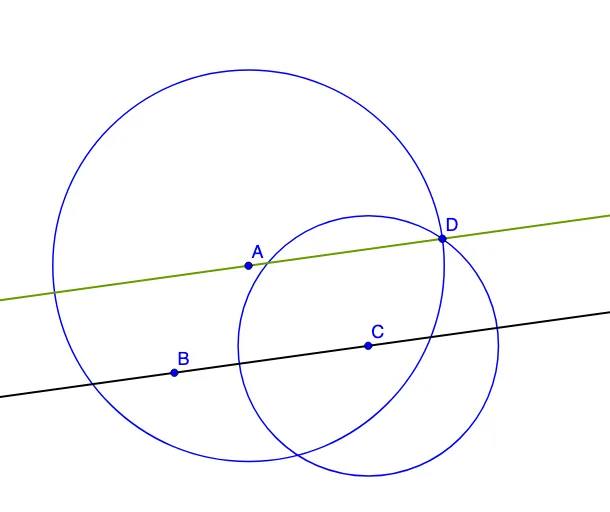
This example demonstrates how to construct the line through a given point that is parallel to a given line. It uses classic geometry construction ideas: circle intersections to transfer equal distances/angles into an enforceable parallel relationship. The key mathematics includes the definition of parallel lines via angle correspondence (or equivalent geometric invariants) and the strategy of converting an abstract condition (parallelism through a point) into concrete construction steps based on circles and their intersection points. Construction highlights in GeoGebra: Line is used to create and connect lines (e.g., the given and auxiliary lines), Circle is used to draw circles with appropriate centers and radii, and Intersect is used to compute critical intersection points (such as B, C, A, D_1, D). Those points are then connected to obtain the final line that runs parallel to the reference line. Suitable for middle- to high-school geometry practice and as an introductory proof/construction activity in dynamic geometry.
GeoGebra Commands & Parameters
Line(B, C) → aCircle(C, Segment[A, B]) → cCircle(A, Segment[B, C]) → dIntersect(c, d) → D_1, D, ,Line(A, D) → b
AI Drawing Prompt Reference
Draw a line through a given point parallel to another given line. Use circles to transfer equal distances or angles and establish a parallel relationship through their intersections. Start by drawing a line, then draw two circles with the line segment as the radius. Find the intersection points of the circles, and finally connect the given point to one of the intersection points to get the parallel line.
The prompt above was compiled from the original drawing commands and is for reference only.