
Parabolic Motion: Dynamic Demonstration of Geometry and Calculus
Loading the math board and drawing, please wait…
In collections
El dominio del Tiempo (cinemática intuitiva)
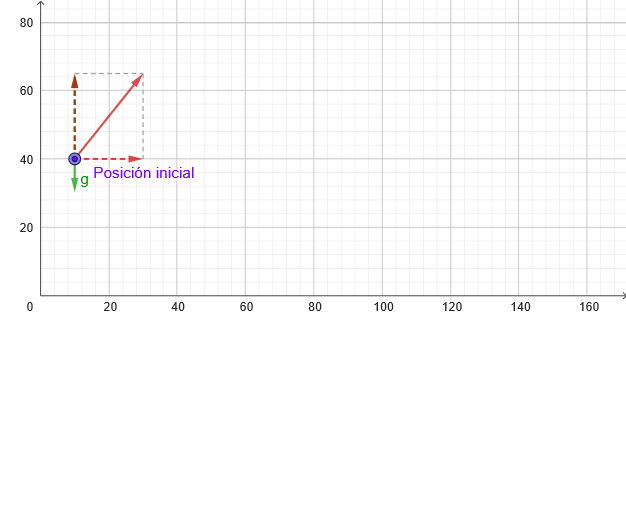
This example demonstrates parabolic motion in a two-dimensional plane, involving vector analysis, geometric transformations, and integral concepts. Construction points include using GeoGebra commands such as PointIn, Segment, Vector, and PolyLine to create parabolic trajectories, with parameterized animation to show motion. Suitable for high school students or college undergraduates learning analytic geometry, calculus fundamentals, and geometric construction techniques.
GeoGebra Commands & Parameters
PointIn(x ≥ 0 ∧ y ≥ 0) → PTextfield(vx) → CasillaDeEntrada1Segment(P, (x(P), 0)) → hAbajoVector((x(M), y(P)), (x(M) + vx, y(P))) → vx_{1}Textfield(vy) → CasillaDeEntrada2Vector((x(P), y(P)), (x(P), y(P) + vy)) → vy_{1}Segment(P, (x(P), y(P) + vy^(2) / ((2 * abs(g))))) → hArribaVector((x(P), y(M)), (x(P), y(M + v))) → vvPolyLine(reg) → pol
AI Drawing Prompt Reference
Draw a graph that describes parabolic motion, including a starting point P, a horizontal line hAbajo, a vertical line hArriba, two vectors vx_{1} and vy_{1}, and a polygon pol representing the motion trajectory. The starting point P is located in the first quadrant, the horizontal line hAbajo is parallel to the x-axis, and the vertical line hArriba is parallel to the y-axis. The vector vx_{1} represents the horizontal velocity, and the vector vy_{1} represents the vertical velocity. The polygon pol represents the parabolic motion trajectory, which changes dynamically according to the given parameters vx and vy.
The prompt above was compiled from the original drawing commands and is for reference only.