
Geometric Chaos Demo for a Double Pendulum
Loading the math board and drawing, please wait…
In collections
El dominio del Tiempo (cinemática intuitiva)
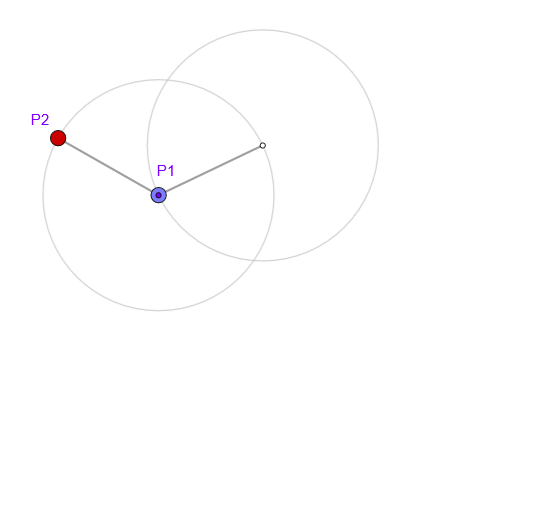
This example demonstrates the hallmark chaotic behavior of a double pendulum by animating how its bob positions evolve over time: tiny differences in initial conditions lead to rapidly diverging motion. The key mathematics includes nonlinear dynamics governed by (second-order) differential equations, the numerical time-stepping idea (via a chosen time step), and geometric constructions that encode motion using vectors and orthogonal (tangent/normal) directions. Construction highlights extracted from the command list: Circle, Arc, Point, Segment, UnitOrthogonalVector, and PolyLine are used to build the circular arcs and key points, then connect them with segments; objects such as l and O define the pivot and baseline geometry; parameters and intermediate quantities for the first arm/bob are represented by c1, arc1, P1, M1, r1 together with related tangent/normal components (e.g., vt1, gt1, n1, gt1); analogous elements for the second arm/bob are given by c2, arc2, P2, M2, r2 and vt2/gt2/n2; anima and the time variables t, dt, t0, t1, tt, tPausa coordinate the animation. This is well-suited for high school to undergraduate instruction on modeling, numerical simulation, dynamical systems, and interactive exploration of chaos in GeoGebra.
GeoGebra Commands & Parameters
Circle(O, l) → c1Arc(c1, Point[c1, 0.76389], Point[c1, 0.25]) → arc1Point(arc1) → P1Point(c1) → M1Segment(O, M1) → r1UnitOrthogonalVector(r1) → n1Circle(M1, l) → c2Arc(c2, Point[c2, 0.76389], Point[c2, 0.25]) → arc2Point(arc2) → P2Point(c2) → M2Segment(M1, M2) → r2UnitOrthogonalVector(r2) → n2PolyLine(reg) → pol
AI Drawing Prompt Reference
Draw a double pendulum to demonstrate chaotic behavior, showing how the pendulum bob positions evolve over time. Start by drawing two circles with fixed points as centers and specific radii, then take points on these circles and connect them to the fixed points to form the pendulum arms. Use vector tools to determine the tangent and normal directions of the arms, and draw the motion trajectories of the bobs. Animate the pendulum to show chaotic motion, emphasizing how tiny differences in initial conditions lead to rapidly diverging paths.
The prompt above was compiled from the original drawing commands and is for reference only.