
Parabola Recursion
Loading the math board and drawing, please wait…
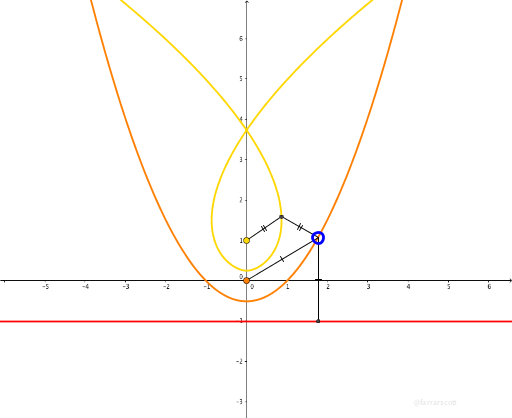
This example demonstrates the recursive construction of parabolas. It involves parabolas, similar triangles, and geometric mean. Using GeoGebra commands such as Line, Parabola, and Tangent, a series of recursive parabolas can be constructed. Suitable for high school mathematics education and learning.
GeoGebra Commands & Parameters
Line(A, B) → fParabola(C, f) → cPoint(c) → DTangent(D, c) → g,OrthogonalLine(D, g) → hCircle(H, D) → dCircle(D, Segment[H, D]) → eIntersect(d, e, 2) → EIntersect(d, e, 1) → FLine(E, F) → iIntersect(h, i) → GLocus(G, D) → loc1Segment(D, G) → jSegment(G, H) → kSegment(C, D) → lOrthogonalLine(D, f) → mIntersect(f, m) → ISegment(D, I) → n
AI Drawing Prompt Reference
Start with a line and a point not on it. Construct a parabola with the point as focus and the line as directrix. Pick a moving point on the parabola, draw its tangent and normal. With a fixed point on the normal as center, draw a circle through the moving point; also draw a circle centered at the moving point with radius equal to the distance to the fixed point. These two circles intersect at two points; connect them to form a line that meets the normal at another point. Trace the locus of this intersection as the moving point travels along the parabola. Also connect the moving point to the fixed point, to the intersection, and to the focus, and drop a perpendicular from the moving point to the directrix, connecting the foot to the moving point, creating a set of related segments and triangles.
The prompt above was compiled from the original drawing commands and is for reference only.