
Parabola (Focus / Directrix) Dynamic Construction
Loading the math board and drawing, please wait…
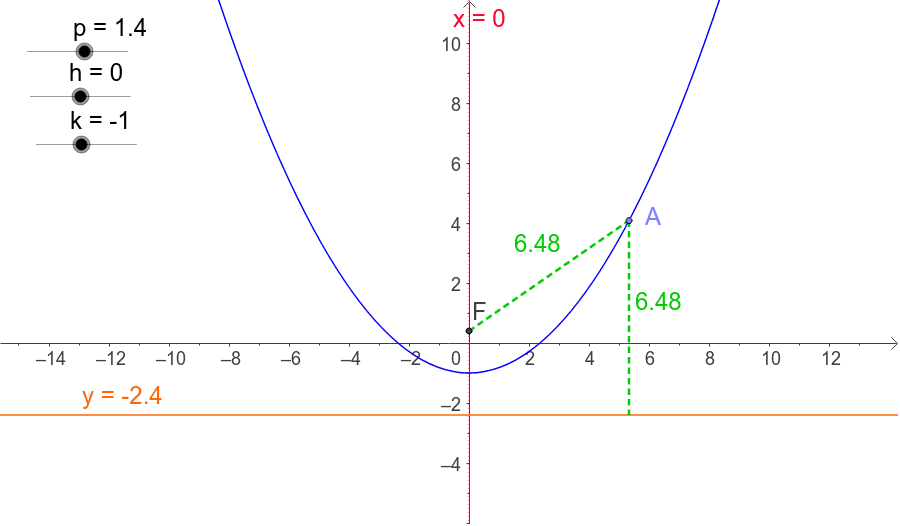
① This example demonstrates the definition of a parabola as the locus of points equidistant from a fixed point (focus F) and a fixed line (directrix d). ② The core mathematical concept is the conic section parabola, involving focus, directrix, axis of symmetry, and the quadratic function graph. ③ Construction details: using GeoGebra commands Point to create focus and points on the directrix, Segment to draw segments, OrthogonalLine to construct perpendiculars, and Intersect to find intersection points; sliders or parameters control the focus position and distance to the directrix, generating moving points on the parabola and their trace. ④ Suitable for high school analytic geometry or introductory college geometry courses, providing an intuitive understanding of the parabola's standard equation and geometric properties, and useful for teacher demonstrations or student self-exploration.
GeoGebra Commands & Parameters
Point(c) → ASegment(F, A) → dOrthogonalLine(A, b) → eIntersect(b, e) → BSegment(A, B) → f
AI Drawing Prompt Reference
Draw a dynamic parabola construction: place a fixed focus point and a fixed directrix line. Pick a moving point on the directrix, connect it to the focus with a segment, then draw a perpendicular line through that point to the directrix. The intersection of this perpendicular with the perpendicular bisector of the focus-to-point segment gives a point on the parabola. As the point moves along the directrix, trace the intersection to reveal the parabola. Include the focus, directrix, connecting segment, perpendicular line, and traced locus, showing that distances from the focus and directrix are equal.
The prompt above was compiled from the original drawing commands and is for reference only.