
Painted Cube 5x5x5: 3D Geometry and Counting Exploration
Loading the math board and drawing, please wait…
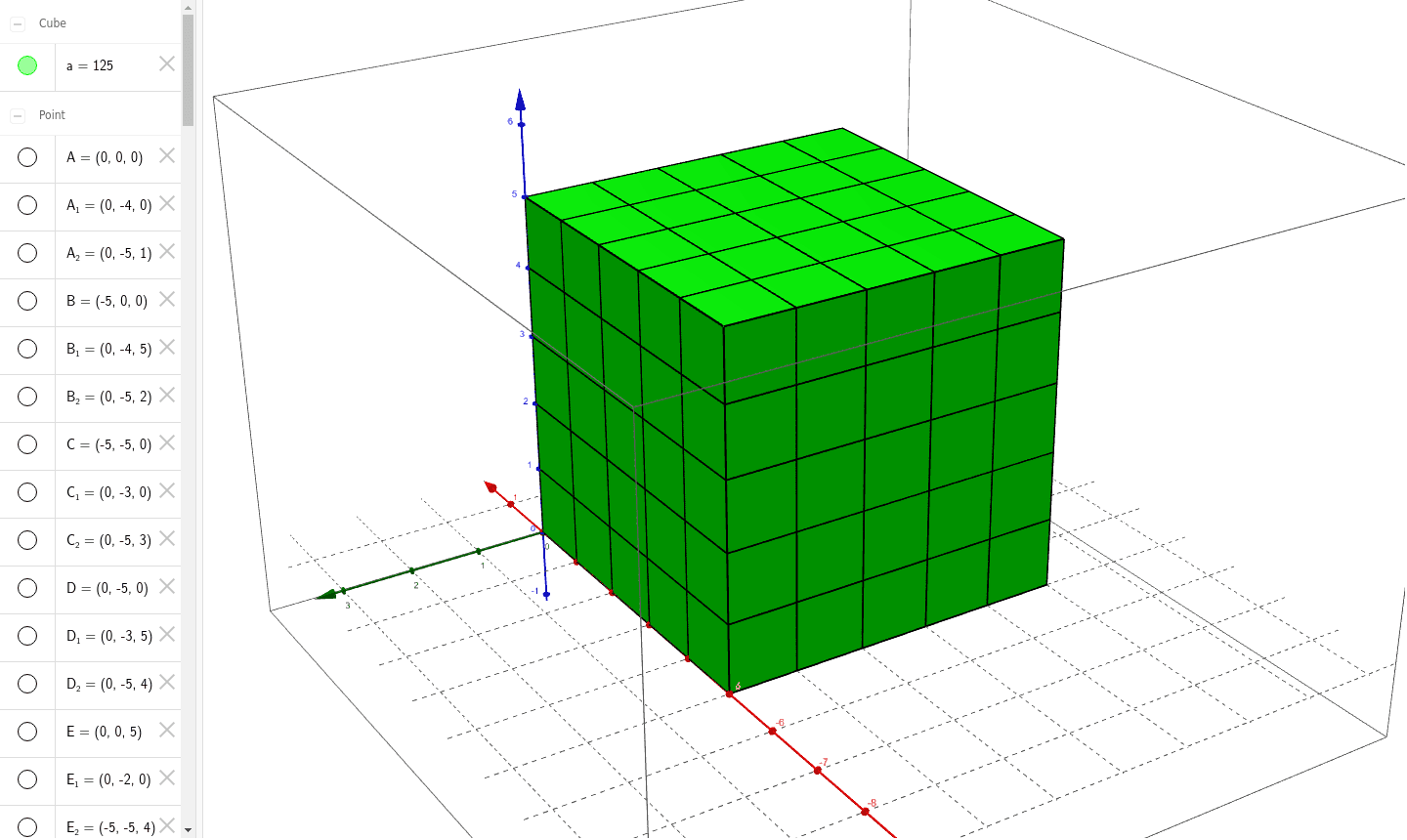
This GeoGebra example demonstrates a 5x5x5 cube with its exterior surface painted, leaving inner unit cubes unpainted, to visually explore the classic painted cube counting problem. Core mathematical concepts include solid geometry (cube structure), surface area vs. volume relationships, and combinatorial classification of unit cubes by the number of painted faces (3, 2, 1, or 0). The construction uses GeoGebra commands: Point to define vertices, Cube to build the main solid, PointIn to mark interior points, and Segment to draw edges and auxiliary lines. Objects include faces (faceABCD, faceADHE, etc.), edges (edgeAD, edgeAB, etc.), and points (I, J, K, L, M, N, O, P, Q) for interactive exploration. Suitable for middle and high school students, this example supports spatial reasoning, combinatorial counting practice, and introductory solid geometry lessons, and can be used for inquiry-based learning or math competition preparation.
GeoGebra Commands & Parameters
Point(xAxis) → APoint(xAxis) → BPoint(Circle[B, Distance[A, B], Segment[A, B]]) → CCube(A, B, C) → a, D, faceCDHG, faceEFGH, edgeAD, edgeAB, edgeBC, edgeCD, edgeAE, edgeDH, edgeEH, edgeEF, E, edgeBF, edgeFG, edgeCG, edgeGH, F, G, H, faceABCD, faceADHE, faceABFE, faceBCGFPoint(edgeBC) → IPointIn(faceBCGF) → JSegment(I, J) → bPoint(edgeBC) → KPoint(edgeFG) → LSegment(K, L) → cPoint(edgeBC) → MPoint(edgeFG) → NSegment(M, N) → dPoint(edgeBC) → OPointIn(faceBCGF) → PSegment(O, P) → ePoint(edgeCD) → QPoint(edgeGH) → RSegment(Q, R) → fPoint(edgeCD) → SPoint(edgeGH) → TSegment(S, T) → gPoint(edgeCD) → UPoint(edgeGH) → VSegment(U, V) → hPoint(edgeCD) → WPointIn(faceCDHG) → ZSegment(W, Z) → iPoint(yAxis) → A_1Point(edgeEH) → B_1Segment(A_1, B_1) → jPoint(yAxis) → C_1Point(edgeEH) → D_1Segment(C_1, D_1) → kPoint(yAxis) → E_1PointIn(faceADHE) → F_1Segment(E_1, F_1) → lPoint(yAxis) → G_1PointIn(faceADHE) → H_1Segment(G_1, H_1) → mPoint(xAxis) → I_1Point(edgeEF) → J_1Segment(I_1, J_1) → nPoint(xAxis) → K_1Point(edgeEF) → L_1Segment(K_1, L_1) → pPoint(xAxis) → M_1Point(edgeEF) → N_1Segment(M_1, N_1) → qPoint(xAxis) → O_1Point(edgeEF) → P_1Segment(O_1, P_1) → rSegment(P, B_1) → sSegment(D_1, N) → tSegment(L, F_1) → a_1Segment(J, H_1) → b_1Segment(Z, P_1) → c_1Segment(N_1, V) → d_1Segment(T, L_1) → e_1Segment(R, J_1) → f_1Segment(Q, I_1) → g_1Segment(S, K_1) → h_1Segment(U, M_1) → i_1Segment(W, O_1) → j_1Segment(A_1, O) → k_1Segment(M, C_1) → l_1Segment(E_1, K) → m_1Segment(G_1, I) → n_1Point(zAxis) → Q_1Point(edgeBF) → R_1Segment(Q_1, R_1) → p_1Point(zAxis) → S_1Point(edgeBF) → T_1Segment(S_1, T_1) → q_1Point(zAxis) → U_1Point(edgeBF) → V_1Segment(U_1, V_1) → r_1Point(zAxis) → W_1PointIn(faceABFE) → Z_1Segment(W_1, Z_1) → s_1Point(edgeDH) → A_2Segment(Q_1, A_2) → t_1Point(edgeDH) → B_2Segment(S_1, B_2) → a_2Point(edgeDH) → C_2Segment(U_1, C_2) → b_2Point(edgeDH) → D_2Segment(W_1, D_2) → c_2Point(edgeCG) → E_2Segment(D_2, E_2) → d_2Point(edgeCG) → F_2Segment(C_2, F_2) → e_2Point(edgeCG) → G_2Segment(B_2, G_2) → f_2Point(edgeCG) → H_2Segment(A_2, H_2) → g_2Segment(Z_1, E_2) → h_2Segment(V_1, F_2) → i_2Segment(T_1, G_2) → j_2Segment(R_1, H_2) → k_2