
Orthocenter Construction in an Acute Triangle
Loading the math board and drawing, please wait…
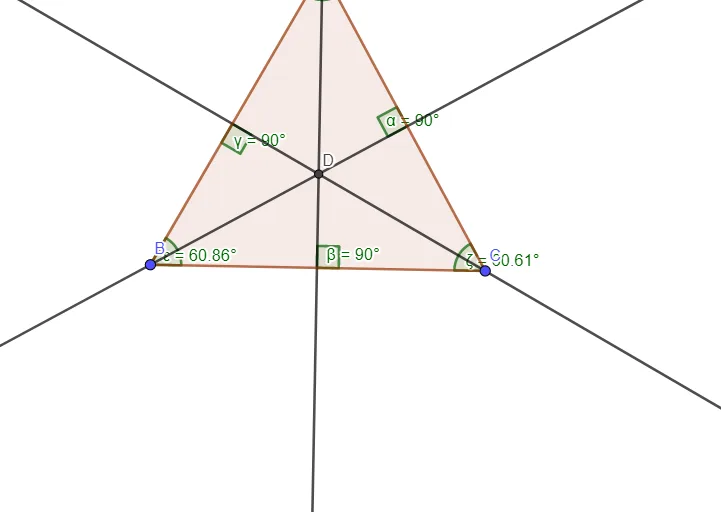
This example demonstrates how the orthocenter of an acute triangle is obtained as the intersection point of the triangle’s three altitudes. It highlights the geometric phenomenon that for an acute triangle, all altitudes meet inside the triangle. The key concepts include orthocenter, altitudes (perpendicular lines from vertices to opposite sides), line intersection, and angle relationships using both explicit Angle objects and InteriorAngles to reflect internal angle structure. Construction approach: build triangle ABC with Polygon; generate the three altitude lines using OrthogonalLine (each through a vertex and perpendicular to the opposite side); compute the orthocenter as the intersection of two altitudes via Intersect (the construction also tracks the resulting point such as D); and use Angle together with InteriorAngles to display the relevant angle measures and confirm the right-angle/perpendicular conditions visually. The construction summary indicates objects like A, B, C, the intersection point D, and multiple angle variables (α, β, γ, δ, ε, ζ). Suitable for secondary school geometry instruction, interactive classroom demonstrations, and exploratory learning on triangle centers and geometric constructions.
GeoGebra Commands & Parameters
Polygon(A, B, C) → t1, c, a, bOrthogonalLine(A, a) → fOrthogonalLine(B, b) → gOrthogonalLine(C, c) → hIntersect(g, h) → DAngle(b, g) → αAngle(a, f) → βAngle(c, h) → γInteriorAngles(t1) → δ, ε, ζ
AI Drawing Prompt Reference
Draw a triangle ABC, then construct the three altitudes from each vertex to the opposite side, resulting in lines f, g, and h. Find the intersection point D of two altitudes, which is the orthocenter of the triangle. Finally, measure and display angles α, β, and γ, as well as the internal angles δ, ε, and ζ, to confirm the properties of the orthocenter.
The prompt above was compiled from the original drawing commands and is for reference only.