
Constructing the Orthocenter of an Obtuse Triangle
Loading the math board and drawing, please wait…
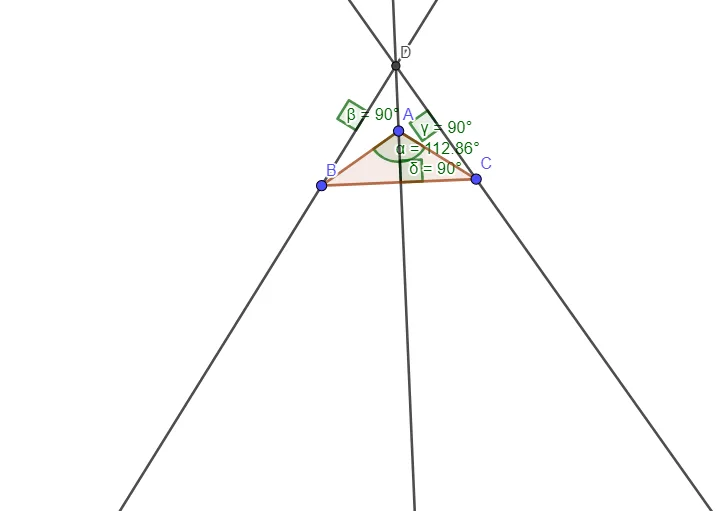
This GeoGebra example demonstrates how to construct the orthocenter of an obtuse triangle and visualize where it lies relative to the triangle (notably, the orthocenter moves outside the triangle in the obtuse case). It focuses on core geometry ideas: the definition of the orthocenter as the intersection of the three altitudes, the properties of perpendicular lines, and the angle relationships that guide the construction. Construction outline: Polygon is used to build triangle ABC; Angle sets up the relevant angle information for the configuration; OrthogonalLine draws the altitudes from vertices to the opposite sides; and Intersect computes the intersection point(s) of these altitudes to obtain the orthocenter and related auxiliary points. Suitable for secondary-level Euclidean geometry instruction, GeoGebra-based geometry construction lessons, and student exploration of how changing triangle shape affects the orthocenter’s position.
GeoGebra Commands & Parameters
Polygon(A, B, C) → t1, c, a, bAngle(B, A, C) → αOrthogonalLine(A, a) → fOrthogonalLine(C, c) → gOrthogonalLine(B, b) → hIntersect(f, g) → DAngle(b, h) → βAngle(c, g) → γAngle(a, f) → δ
AI Drawing Prompt Reference
Draw an obtuse triangle ABC and include the relevant angle information at the vertices. Construct the altitudes by drawing the line through A perpendicular to side BC, the line through C perpendicular to side b (the side opposite B), and the line through B perpendicular to side a (the side opposite A). Determine the orthocenter D as the intersection point of the three altitudes. Add angle markings that help visualize the configuration, including the angles formed at the altitude directions (at B and C relative to the corresponding sides), and also the angle formed at A between its altitude and the opposite side. Present the construction in the order: triangle first, then the three altitudes, then the intersection point, and finally the angle labels.
The prompt above was compiled from the original drawing commands and is for reference only.