
Orthocenter Calculation in Triangles
Loading the math board and drawing, please wait…
In collections
barycentric coordinates
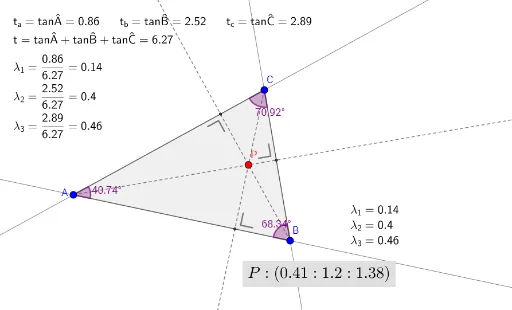
This example demonstrates how to calculate and draw the orthocenter of a triangle along with related geometric elements using GeoGebra. It involves core mathematical concepts such as coordinate geometry, perpendicular lines, triangle geometry properties, and vector operations. The construction utilizes commands and objects like Line, OrthogonalLine, Invert, Intersect, Segment, Element, Polygon, FractionText, Angle, and Ray as outlined in the construction summary. It is suitable for high school and above students to understand the properties of orthocenters and applications of coordinate geometry.
GeoGebra Commands & Parameters
Line(B, C) → mOrthogonalLine(A, m) → nLine(A, C) → lOrthogonalLine(B, l) → qInvert(MM) → matrix_1Intersect(q, n) → PSegment(A, B) → gSegment(C, A) → fElement(LL, 1, 1) → λ_1Segment(B, C) → hElement(LL, 2, 1) → λ_2Element(LL, 3, 1) → λ_3Polygon(A, B, C) → driehoek1, c, a, bFractionText(λ_1) → tekst1FractionText(λ_2) → tekst3FractionText(λ_3) → tekst4Angle(B, A, C) → αAngle(C, B, A) → βAngle(A, C, B) → γLine(A, B) → kOrthogonalLine(C, k) → pIntersect(l, q) → DIntersect(m, n) → EIntersect(k, p) → FRay(A, E) → sRay(C, F) → rRay(B, D) → tAngle(C, E, A) → δAngle(C, F, B) → εAngle(A, D, B) → ζ
AI Drawing Prompt Reference
Draw a triangle ABC with its three sides. Construct the perpendicular from A to BC and the perpendicular from B to AC, and their intersection is the orthocenter P. Then draw the altitudes from each vertex to the opposite side, which intersect the perpendiculars at points D, E, and F. Finally, draw rays from A through E, from C through F, and from B through D.
The prompt above was compiled from the original drawing commands and is for reference only.