
Orthocenter Animation Demo
Loading the math board and drawing, please wait…
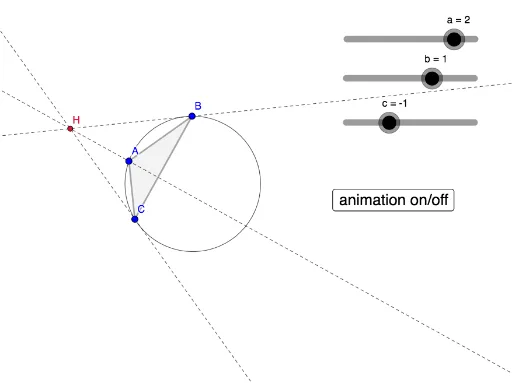
This example demonstrates the dynamic behavior of a triangle's orthocenter through animation. It involves key mathematical concepts like orthocenter, step functions, congruence, circumcircle, inequalities, and isosceles triangles. GeoGebra commands such as Intersect, Point, Circle, Polygon, and OrthogonalLine are used in the construction. Suitable for high school mathematics education to explore orthocenter properties and related triangle geometry.
GeoGebra Commands & Parameters
Intersect(xAxis, yAxis) → A_1Point(xAxis) → B_1Circle(A_1, B_1) → ccPoint(cc) → CPoint(cc) → APoint(cc) → BPolygon(C, A, B) → t1, e, c_1, dOrthogonalLine(A, d) → fOrthogonalLine(B, e) → gIntersect(f, g) → HOrthogonalLine(C, c_1) → h
AI Drawing Prompt Reference
Create an animation demonstrating the dynamic behavior of a triangle's orthocenter, including a triangle, its circumcircle, and orthocenter. Start by plotting the intersection of coordinate axes and drawing a circle, then mark three points on the circle to form a triangle. Next, draw the sides of the triangle and the perpendicular lines from each vertex to the opposite side. Finally, find the intersection of these perpendicular lines to determine the orthocenter and show its movement as the triangle changes.
The prompt above was compiled from the original drawing commands and is for reference only.