
Orbit Lab 3.2 – Satellite Orbit Challenges
Loading the math board and drawing, please wait…
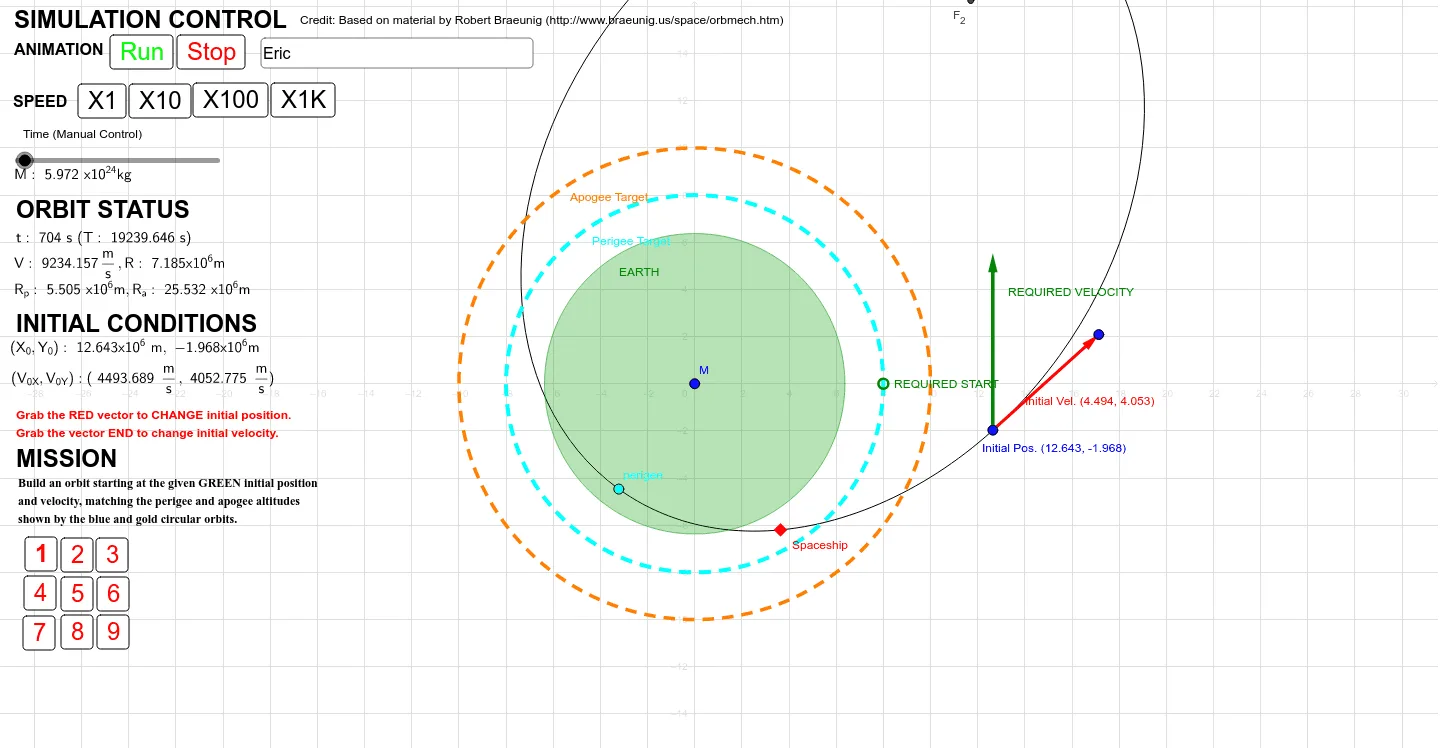
This GeoGebra worksheet presents nine progressive challenges that guide users to construct and explore satellite orbits around the Earth. Key mathematical topics include elliptical orbit parameterization, vector operations, conditional functions, derivatives and Riemann sums for area approximation, and the geometry of tangents and special points. Construction relies on commands such as Vector, Ellipse, If, Mod, Intersect, Ray, Polygon, Circle, Textfield, and Function, with dynamic variables like M_earth, e, R_a, R_p, v_0, γ_0, t, and Z_factor controlling orbital radius, eccentricity, velocity vectors, and launch angles. Designed for high‑school to university students and educators in physics or mathematics, the lab offers hands‑on practice with parametric curves, calculus concepts, and interactive graphing.
GeoGebra Commands & Parameters
Vector(x_{0D}, B) → v_{D0}Min(R_1, R_2) → R_pMax(R_1, R_2) → R_aEllipse(F_1, F_{2D}, x_{0D}) → O_DIf(γ_0 > π, -1, 1) → DirMod(t + δ_t, T / Z_t) → t_1Intersect(M_{anomx}, d, (1.2339668168289273, 0.2528790649013863)) → A_1Vector(F_1, (cos(υ_1 + υ_o), sin(υ_1 + υ_o))) → u_1Ray(F_1, u_1) → u_{rδ}Intersect(M_{anomx}, b, (1.1551529610085673, 0.22990871866996482)) → A_{anom}Vector(F_1, (cos(υ_a + υ_o), sin(υ_a + υ_o))) → uIntersect(O_D, Ray[F_1, u]) → x_{ad}, AIntersect(O_D, u_{rδ}) → x_δ, DPolygon(F_1, x_δ, x_{ad}) → poly1, x_3, f_1, x_4Circle(F_1, M_{radius} / Z) → M_{outline}Circle(Perigeetarget, If[progline(8) ≠ 0, 0.5, progline(6)]) → C_{ptarget}Circle(Apogeetarget, If[progline(8) ≠ 0, 0.5, progline(7)]) → C_{atarget}Vector(x_{0D}, x_{0D} + progline(4)) → V_{0Dtarget}Textfield(AstronautName) → InputBox1Function(If[abs((x - y) / y) < 0.05, 1, 0], 0, 0, 0, 0) → CloseToFunction(abs(x - y) < (0.05 * π), 0, 0, 0, 0) → CloseToAngleIf(CloseTo(Length[v_{D0}], Length[V_{0Dtarget}]) ≟ 1 ∧ CloseToAngle(Angle[v_{D0}], Angle[V_{0Dtarget}]) ≟ 1 ∨ progline(5) ≟ 0, 1, 0) → V_{0D}MatchIf(CloseTo(Length[x_{0D}], Length[X_{0Dtarget}]) ≟ 1 ∧ CloseToAngle(Angle[x_{0D}], Angle[X_{0Dtarget}]) ≟ 1 ∨ progline(3) ≟ 0, 1, 0) → X_{0D}MatchIf((AstronautName ≠ "Please Enter Your Name") ∧ V_{0D}Match ≟ 1 ∧ X_{0D}Match ≟ 1 ∧ apogeematch ≟ 1 ∧ perigeematch ≟ 1 ∧ (progline(8) ≟ 0 ∨ CloseToAngle(progline(8), υ_o) ≟ 1), 1, 0) → orbitmatch
AI Drawing Prompt Reference
Draw a satellite orbit diagram with an elliptical orbit centered on Earth, marked points for periapsis and apoapsis, tangent lines to the orbit, launch point, target point, and a circle representing Earth's surface. Construction order: first draw the ellipse, then add tangents, then determine launch and target points, then draw the Earth circle, and finally add an input box for astronaut name. Orbit parameters are controlled by eccentricity and radius, vectors represent velocity directions, and conditional functions verify parameter matching.
The prompt above was compiled from the original drawing commands and is for reference only.