
Opening a Cube: Dynamic Unfolding of a Cube's Surface
Loading the math board and drawing, please wait…
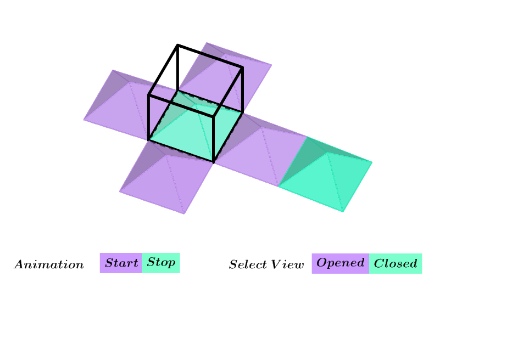
This GeoGebra example dynamically demonstrates the unfolding of a cube (regular hexahedron) by progressively flattening its six faces onto a plane, visually illustrating the correspondence between a 3D solid and its net. Core mathematical concepts include solid geometry (cube structure, face-edge relationships) and spatial transformations such as rotation and reflection. The construction uses GeoGebra commands: Point, Line, Cube, Rotate, Midpoint, Pyramid, Circle, Angle, OrthogonalPlane, Mirror, Intersect, and Segment to build the cube's frameworkchers, rotate faces, and create auxiliary points (e.g., F', I) and faces (faceABCD, faceADHE, etc.). A slider or animation controls the unfolding angle. This resource is suitable for middle school to high school students learning solid geometry, spatial visualization, and geometric transformations, as well as for teachers to demonstrate different cube nets and the transition between 3D and 2D representations.
GeoGebra Commands & Parameters
Point(xAxis) → APoint(yAxis) → BLine(A, B) → hPoint(Circle[B, Distance[A, B], Segment[A, B]]) → CCube(A, B, C) → a, D, faceCDHG, faceEFGH, edgeAD, edgeAB, edgeBC, edgeCD, edgeAE, edgeDH, edgeEH, edgeEF, E, edgeBF, edgeFG, edgeCG, edgeGH, F, G, H, faceABCD, faceADHE, faceABFE, faceBCGFRotate(F, (-s), h) → F'Midpoint(D, F) → IPyramid(faceABCD, I) → b, faceADI, faceABI_1, faceBCI, faceCDI, edgeDI, edgeAI_1, edgeBI_1, edgeCICircle(edgeAB, F) → cAngle(F, B, J) → αPyramid(faceABFE, I) → d, faceABI, faceAEI, faceEFI, faceBFI, edgeBI, edgeAI, edgeEI, edgeFIRotate(d, α, edgeAB) → d'Rotate(d', 90°, zAxis) → d''Rotate(d'', 90°, zAxis) → d'''Rotate(d''', 90°, zAxis) → eLine(B, J) → fMidpoint(B, J) → KOrthogonalPlane(K, f) → gMirror(b, g) → b'Intersect(edgeAE, edgeAD) → LPoint(edgeBF) → MSegment(L, M) → iSegment(L, M) → jPoint(edgeAD) → NSegment(N, L) → kIntersect(edgeCD, edgeBC) → OSegment(O, N) → lSegment(M, O) → mSegment(E, F) → nIntersect(edgeAE, k) → PSegment(E, P) → pIntersect(j, m) → QSegment(Q, F) → q