
One way to trace the Fibonacci spiral
Loading the math board and drawing, please wait…
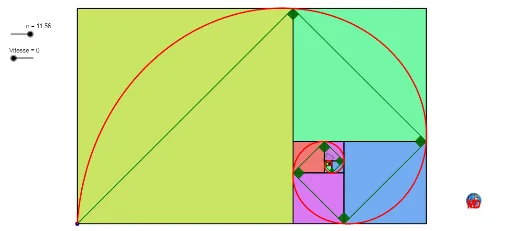
This example demonstrates how to construct the Fibonacci spiral through a series of circular arcs. It involves core mathematical concepts such as sequences, parametric equations, geometric constructions, and optimization problems. Key GeoGebra commands and objects used include Sequence, CircleArc, Point, Circle, Element, Take, CurveCartesian, Polygon, Segment, Midpoint, Rotate, If, Translate, and Angle. Suitable for high school and above, it illustrates the connection between the Fibonacci sequence and geometric shapes, as well as the application of parametric equations.
GeoGebra Commands & Parameters
Sequence(O + ((1 + ί) * (1 - q^(j)) / (1 - q)), j, 0, 50) → l3Sequence(O + ((1 + ί) * (1 - q^(j)) / (1 - q)), j, 0, n) → liste1CircleArc((1, 1), ((1 + ί) * (1 - ί / ϕ)), ((1 + ί) * (1 + ί / ϕ))) → cPoint(c) → ASequence(Polygon[liste1(k), liste1(k) + (liste1(k + 1) - liste1(k)) / (1 + ί), 4], k, 1, Length[liste1] - 1) → liste2Circle((ϕ * (1 + ί)), sqrt(2)) → ePoint(e) → BElement(l3, 50) → z_3Take(liste2, 1, n) → l2CurveCartesian(x(O) + real(((1 + ί) * (1 - q^(t)) / (1 - q))), y(O) + imaginary(((1 + ί) * (1 - q^(t)) / (1 - q))), t, 0, n) → aPolygon(z_3, D, 4) → poly1, f, g, h, i, E, FSegment(z_3, E) → jSegment(G, H) → kMidpoint(O, H) → JSegment(I, C) → lSequence(Segment[Element[liste1, i], Element[liste1, i + 1]], i, 1, Length[liste1]) → l4Segment(z_3, D) → mSequence(Polygon[Element[liste1, k], Element[liste1, k] + (Element[liste1, k + 1] - Element[liste1, k]) / (1 + ί), 4], k, 1, Length[liste1] - 1) → l1Polygon(O, C, 4) → poly2, p, r, s, t, K, LRotate(O, π + abs(If[n < -3.14, (2 * n), (2 * 3.14)]), J) → O'Segment(J, O') → bCircleArc(J, O', O) → dPolygon(K, I, H, C) → q1, k_1, i_1, h_1, c_1If(-4.71 < n < -3.14, 0, If[n < -1.75, 2 - ((-2 * n)) / 3.14, 1]) → aaTranslate(L, Vector[(aa * Vector[L, H])]) → L'Segment(L, L') → f_1If(-4.71 < n ≤ -1.75, 0, If[n < -0.17, 1.11 - ((-2 * n)) / 3.14, 1]) → bbTranslate(I, Vector[(bb * Vector[I, C])]) → I'Segment(I, I') → g_1Angle(I, z_3, L) → αElement(l1, A1) → B1Element(l1, A2) → B2Element(l1, A3) → B3Element(l1, A4) → B4Element(l1, A5) → B5Element(l1, A6) → B6Element(l1, A7) → B7Element(l1, A8) → B8Element(l1, A9) → B9Element(l1, A10) → B10Element(l1, A11) → B11Element(l1, A12) → B12Sequence(Angle[Element[liste1, i], Element[liste1, i + 1], Element[liste1, i + 2]], i, 1, Length[liste1]) → l5
AI Drawing Prompt Reference
Draw a Fibonacci spiral constructed from a series of circular arcs to illustrate the connection between the Fibonacci sequence and geometric shapes. Start by generating points from the Fibonacci sequence and connecting them with circular arcs to form the spiral. Then, connect adjacent points with quadrilaterals and draw lines between these quadrilaterals. Finally, add some helper lines and polygons to complete the image.
The prompt above was compiled from the original drawing commands and is for reference only.