
π = 4 Geometric and Function Construction Example
Loading the math board and drawing, please wait…
In collections
Pi Approximations
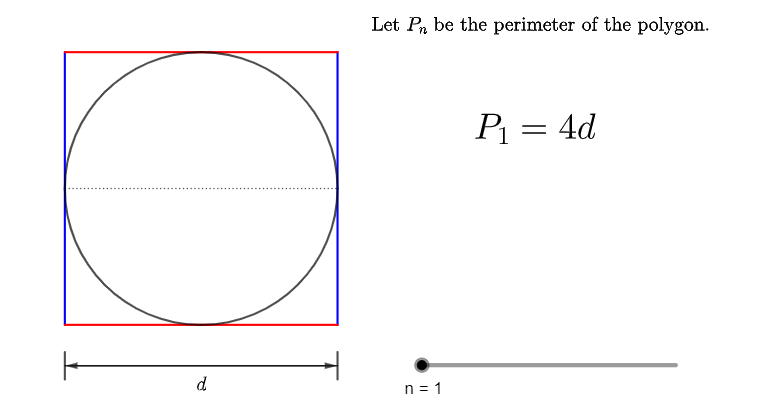
This example demonstrates the approximation of π using geometric shapes and function graphs. Key mathematical concepts include circle equations, quadratic functions, and parametric equations. Construction involves GeoGebra commands like Circle, Segment, Sequence, and Vector to create circles, parabolas, and parametric curves. Suitable for high school students learning coordinate geometry and function graphing, useful for teaching demonstrations and self-exploration.
GeoGebra Commands & Parameters
Circle((0, 0), 1) → cSegment((-1, 0), (1, 0)) → fSequence((sqrt(1 - (i / n)^(2)), i / n), i, 0, n) → l1Sequence(Segment[Element[l1, i], Element[l1, i] + (0, 1 / n)], i, 1, n) → l2Mirror(l2, xAxis) → l2'Mirror(l2, yAxis) → l2'_{1}Mirror(l2', yAxis) → l2''Sequence(Segment[Element[l1, i + 1], Element[l1, i] + (0, 1 / n)], i, 1, n) → l3Mirror(l3, xAxis) → l3'Mirror(l3, yAxis) → l3'_{1}Mirror(l3', yAxis) → l3''Sequence(Segment[Element[l1, i], Mirror[Element[l1, i], yAxis]], i, 2, n) → l4Mirror(l4, xAxis) → l4'Segment((-1, -1.2), (-1, -1.4)) → gSegment((1, -1.2), (1, -1.4)) → hVector(Midpoint[g], Midpoint[h]) → uVector(Midpoint[h], Midpoint[g]) → v
AI Drawing Prompt Reference
Draw a unit circle centered at the origin with radius 1, and include its horizontal diameter. Divide the upper semicircle into equal segments, and connect consecutive division points with vertical short segments to form a staircase-like polyline. Reflect this polyline across the x-axis and y-axis to create symmetric staircase patterns. Then, connect each division point to its mirrored counterpart across the y-axis with slanted segments, and reflect these slanted segments across the x-axis as well, forming a grid-like approximation of the circle. Finally, below the circle, draw two short vertical lines on the left and right, and add a pair of opposite arrows between their midpoints to indicate length comparison. The overall figure illustrates approximating the circle's circumference using geometric steps.
The prompt above was compiled from the original drawing commands and is for reference only.