
Number Line Addition
Loading the math board and drawing, please wait…
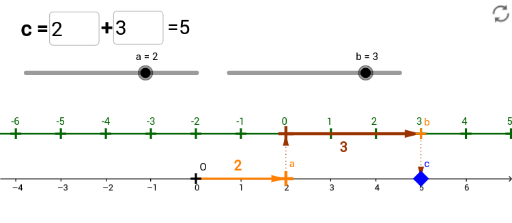
This applet demonstrates addition using a sliding auxiliary number line. Key math concepts include addition and number lines. Commands used include Sequence, Zip, Textfield, Vector, etc. Suitable for upper elementary or middle school students learning addition.
GeoGebra Commands & Parameters
Sequence((xx, 1), xx, xmc + xa, xmax + xa, 1) → ptsListZip(Text[x(pt) - xa, pt + (-0.1, 0.2)], pt, ptsList) → list2Textfield(b) → bInputVector(A, A1) → uVector(A1, B) → vVector(B, C) → wTextfield(a) → InputBox1Vector(O, A) → d
AI Drawing Prompt Reference
Draw a horizontal number line with the origin on the left and tick marks labeled. Above it, place a sliding auxiliary number line parallel to the main one but shifted. On the main number line, select three points representing the addend, augend, and sum, and connect them in order with arrowed vectors to show the addition process. Above the auxiliary line, display numeric labels that update as it slides. Include two input boxes for entering the addend and augend, and the graph adjusts automatically. The layout is clear and suitable for teaching.
The prompt above was compiled from the original drawing commands and is for reference only.