
Number Line Addition Demo by mossback90
Loading the math board and drawing, please wait…
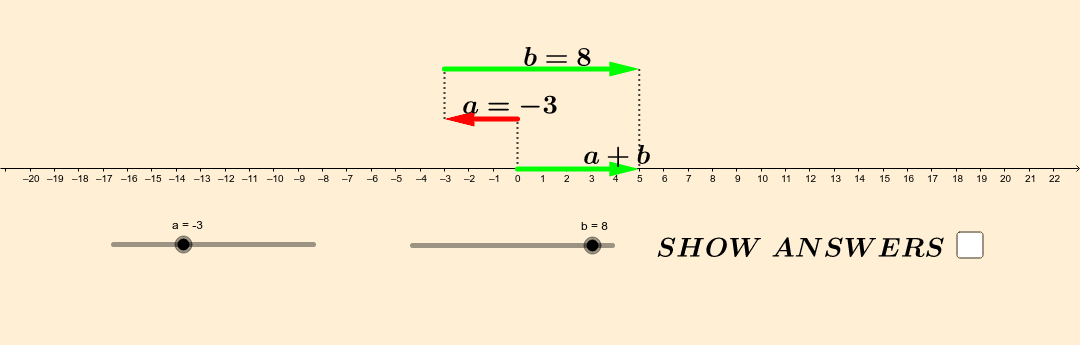
This example demonstrates the addition of positive and negative numbers on a number line, providing a visual and interactive approach to understanding basic arithmetic operations. It involves core math concepts like number line representation, absolute value, and rational number operations. The construction utilizes GeoGebra commands such as Vector, Segment, and Midpoint to create the visual elements. Ideal for middle school mathematics education, helping students grasp number line operations and the connection between numbers and shapes.
GeoGebra Commands & Parameters
Vector(A, B) → uVector(C, D) → vSegment(Z, A) → gSegment(B, C) → hSegment(D, R) → iVector(Z, R) → wVector(Z, R) → w_1Vector(A, B) → u_1Vector(C, D) → v_1Midpoint(C, D) → EMidpoint(A, B) → FMidpoint(Z, R) → G
AI Drawing Prompt Reference
Draw a horizontal number line in a coordinate system and mark several points on it. From one point on the number line, draw an arrow to the right representing a positive number. From another point on the number line, draw an arrow to the left representing a negative number. Connect the starting points of these two arrows to form a line segment. Then, find the midpoint of the endpoints of these arrows and connect this midpoint to the starting point on the number line, forming another line segment. Finally, differentiate the number line, the two line segments, and the two arrows with different colors or styles to clearly illustrate the addition of positive and negative numbers.
The prompt above was compiled from the original drawing commands and is for reference only.