
Nth Roots of a Complex Number by Anna-Lena Boch (2)
Loading the math board and drawing, please wait…
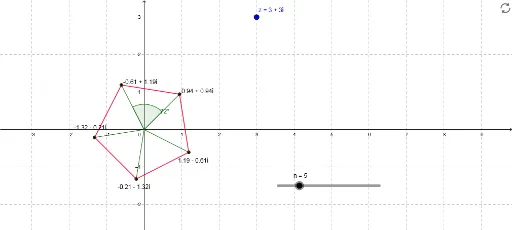
This example demonstrates how to plot all nth roots of a complex number on the complex plane. It involves core mathematical concepts such as the modulus and argument of a complex number, polar coordinates, trigonometric functions, and sequences. The construction uses GeoGebra commands/objects like Length, Sequence, Segment, Angle, and Element. Suitable for high school and above mathematics learners to understand complex number operations and geometric representations.
GeoGebra Commands & Parameters
Length(z) → mod_zSequence((mod_z^(1 / n) * (cos(arg_z + ((2 * k) * π / n)) + (ί * sin(arg_z + ((2 * k) * π / n))))), k, 0, n - 1) → list1Sequence(Segment[Element[list1, k], Element[list1, k + 1]], k, 1, n - 1) → list2Segment(Element[list1, n], Element[list1, 1]) → aSequence(Segment[(0, 0), Element[list1, j]], j, 1, n) → list3Angle(Element[list3, 1], Element[list3, 2]) → αElement(list1, A1) → B1Element(list1, A2) → B2Element(list1, A3) → B3Element(list1, A4) → B4Element(list1, A5) → B5Element(list1, A6) → B6Element(list1, A7) → B7Element(list1, A8) → B8Element(list1, A9) → B9Element(list1, A10) → B10Element(list1, A11) → B11Element(list1, A12) → B12Element(list1, A13) → B13Element(list1, A14) → B14Element(list1, A15) → B15Element(list1, A16) → B16Element(list1, A17) → B17Element(list1, A18) → B18Element(list1, A19) → B19Element(list1, A20) → B20