
Nth Roots of a Complex Number by Anna-Lena Boch
Loading the math board and drawing, please wait…
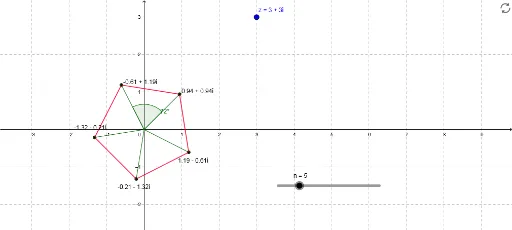
This example demonstrates the nth roots of a complex number. By adjusting parameters, you can observe how the roots change with different n values. Key mathematical concepts include complex numbers, the concept of roots, and calculations of angles and moduli. GeoGebra commands used include Length, Sequence, Segment, Angle, etc. Suitable for high school mathematics education and learning.
GeoGebra Commands & Parameters
Length(z) → mod_zSequence((mod_z^(1 / n) * (cos(arg_z + ((2 * k) * π / n)) + (ί * sin(arg_z + ((2 * k) * π / n))))), k, 0, n - 1) → list1Sequence(Segment[Element[list1, k], Element[list1, k + 1]], k, 1, n - 1) → list2Segment(Element[list1, n], Element[list1, 1]) → aSequence(Segment[(0, 0), Element[list1, j]], j, 1, n) → list3Angle(Element[list3, 1], Element[list3, 2]) → αElement(list1, A1) → B1Element(list1, A2) → B2Element(list1, A3) → B3Element(list1, A4) → B4Element(list1, A5) → B5Element(list1, A6) → B6Element(list1, A7) → B7Element(list1, A8) → B8Element(list1, A9) → B9Element(list1, A10) → B10Element(list1, A11) → B11Element(list1, A12) → B12Element(list1, A13) → B13Element(list1, A14) → B14Element(list1, A15) → B15Element(list1, A16) → B16Element(list1, A17) → B17Element(list1, A18) → B18Element(list1, A19) → B19Element(list1, A20) → B20