
Notable Lines Fractal: Iterated geometry from two special points
Loading the math board and drawing, please wait…
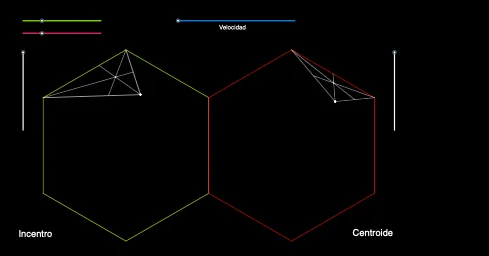
This example demonstrates how a fractal-like, self-similar figure can be generated by starting from two notable (special) points and repeatedly applying geometric construction and similarity steps. The key ideas are fractal geometry, geometric construction methods, angle bisectors, midpoints, and iterative building of new vertices via transformations. In GeoGebra, the construction uses Polygon to create the base polygonal shapes, Random to select/generate initial point placement, Dilate to perform similarity scaling that propagates the structure to the next iteration, Segment to define connecting edges, AngularBisector to obtain bisected angles, Intersect to compute intersection points, and Midpoint to create midpoints that serve as new seeds. Objects such as poly1/poly2 and the derived points (e.g., A, B, C, D and their iterated counterparts) are combined into successive layers, producing the observed fractal pattern. Suitable for advanced middle school through early university, as well as for classroom demonstrations of iterative geometry and fractal generation.
GeoGebra Commands & Parameters
Polygon(A, B, 6) → poly1, f, F, g, h, i, j, k, C, D, ERandom(1, 6) → rPolygon(B, A, 6) → poly2, l, J, m, p, q, t, a, G, H, IDilate(C, If[b ≤ 1 ∧ b ≥ 0, b, 1], K) → C'Dilate(D, If[b ≤ 1 ∧ b ≥ 0, b, 1], K) → D'Segment(D', K) → cSegment(K, C') → dAngularBisector(C, D, K) → eAngularBisector(D, K, C) → f_1AngularBisector(D, C, K) → g_1Intersect(e, d) → OIntersect(g_1, c) → PIntersect(f_1, h) → QDilate(O, If[b ≤ 2 ∧ b ≥ 1, b - 1], D) → O'Dilate(P, If[b ≤ 2 ∧ b ≥ 1, b - 1], C) → P'Segment(P', C) → h_1Segment(O', D) → i_1Intersect(i_1, h_1) → SDilate(J, If[o ≤ 1 ∧ o ≥ 0, o, 1], L) → J'Dilate(I, If[o ≤ 1 ∧ o ≥ 0, o, 1], L) → I'Segment(L, J') → k_1Segment(L, I') → l_1Midpoint(L, I') → RMidpoint(L, J') → TMidpoint(t) → UDilate(T, If[o ≤ 2 ∧ o ≥ 1, o - 1], I) → T'Dilate(U, If[o ≤ 2 ∧ o ≥ 1, o - 1], L) → U'Dilate(R, If[o ≤ 2 ∧ o ≥ 1, o - 1], J) → R'Segment(L, U') → m_1Segment(J, R') → p_1Segment(T', I) → q_1Intersect(q_1, m_1) → VDilate(Q, If[b ≤ 2 ∧ b ≥ 1, b - 1], K) → Q'Segment(Q', K) → r_1
AI Drawing Prompt Reference
Start from two special points and iteratively generate a fractal shape using geometric constructions and similarity transformations. Begin with points A and B forming a base shape. Then, use angle bisectors, connecting line segments, and midpoints to iteratively create new points. The process gradually makes the pattern more complex, forming a self-similar design. Key objects include the initial points, iterated points, angle bisector intersection points, and connecting line segments. The construction order starts with the base shape, then adds new points and performs similarity transformations, eventually forming the fractal pattern.
The prompt above was compiled from the original drawing commands and is for reference only.