
Norman Window: Adjustable Explorer
Loading the math board and drawing, please wait…
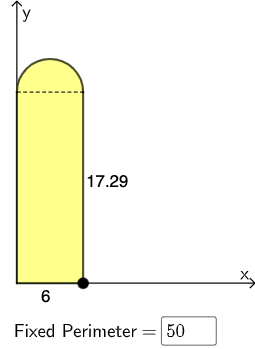
This example demonstrates the geometric construction of a Norman window and its area optimization problem. Key mathematical concepts include functions, derivatives, and optimization. Using GeoGebra commands such as Roots, Point, Semicircle, and Polygon, the size of the window can be dynamically adjusted to observe changes in area. Suitable for high school mathematics education and learning.
GeoGebra Commands & Parameters
Roots(f, 0.1, 1000) → CPoint(Segment[(0, 0), C]) → ATextfield(P) → InputBox1Semicircle(D, B) → cSegment(D, B) → gSegment(B, A) → hIntersect(f, xAxis, 1) → ESegment(D, E) → iPolygon(E, A, B, D) → q1, e, a, b, dSemicircle(D, B) → kExtremum(p) → FRoots(p, 0.1, 1000) → GSegment((0, 0), A) → j
AI Drawing Prompt Reference
Draw a geometric construction of a Norman window and its area optimization. Start by plotting a function and finding its intersection with the x-axis. Draw a semicircle with the diameter as the line segment connecting this intersection to another point on the function. Then, connect the endpoints of the semicircle to form a quadrilateral and another semicircle based on the function's extremum. Finally, dynamically adjust the size to observe changes in area.
The prompt above was compiled from the original drawing commands and is for reference only.