
Normal Vectors and Geometric Construction
Loading the math board and drawing, please wait…
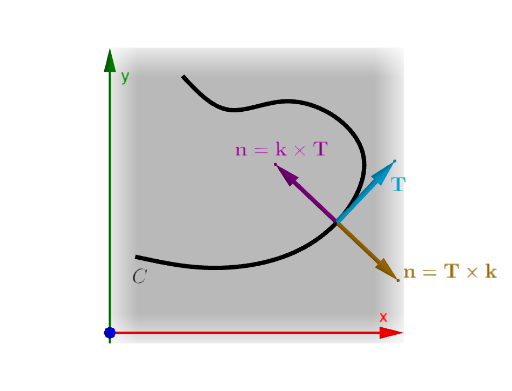
This example demonstrates how to understand normal vectors through geometric construction and vector operations. Key mathematical concepts include vectors, geometric construction, and coordinate geometry. Construction involves using GeoGebra commands such as Spline, Point, Tangent, OrthogonalLine, etc. Suitable for high school students or college freshmen learning vector and geometry integration.
GeoGebra Commands & Parameters
Spline({A, B, C, D, E, F, G, H}, 3) → cPoint(c, t) → PTangent(P, c) → tangOrthogonalLine(P, tang, xOyPlane) → perpCircle(P, 1, xOyPlane) → cirIntersect(perp, cir, 1) → Q1Intersect(perp, cir, 2) → Q2Vector(P, Q1) → uVector(P, Q2) → vTranslate(Vector[(0, 0, 1)], P) → kElement(vdir, faces) → SelectVecLaTeX(faces, true, true) → text1Intersect(tang, cir, 1) → P1Intersect(tang, cir, 2) → P2Vector(P, P1) → tvector
AI Drawing Prompt Reference
Create a 3D coordinate scene with a smooth spline curve defined through several given control points. Choose a point P on the curve. Through P, draw the tangent to the curve, then construct the line perpendicular to that tangent at P (the normal direction). With P as center and radius 1, draw a circle in the same plane so that it intersects the normal line at two points Q1 and Q2. Form vectors from P to Q1 and from P to Q2. Also translate P by the vector (0,0,1) to indicate the spatial direction of the normal. Finally, find the two intersection points of the tangent and the circle (P1 and P2) and draw the tangent vector from P toward P1.
The prompt above was compiled from the original drawing commands and is for reference only.